Gone fishing
I haven’t really gone fishing…that’s not my idea of a good time. (I feel sorry for the fish.) But I might look at some fish next week through a mask, because I’m going to an island, baby!
My college buddies, Dede, Denise, KC, Ann and I, are going to celebrate turning 50 this year by spending six days in Barbados. It feels like a miracle. Since we graduated from Mount Holyoke 28 years ago, we try to get together once a year, but it’s usually a long weekend. In recent years, a half-marathon location has been the destination.
But this time, we’re celebrating bigger and we’re actually going on an agenda-free, responsibility-free, relaxation-centric vacation.

I never do this. My travel almost always includes either work or family (not that I don’t manage to have fun). But to go to a warm place when it’s cool at home and lounge about with some of my favorite people? Heaven.
I’m struggling with whether to shut down completely or try to keep up with my business to make things easier when I return home. I’ve decided to take my computer so I can do family history research at my leisure (that’s my idea of fun and relaxation). I’ll keep up with the news—particularly since we’ll be gone during election week.
But I’m not planning to blog. And I’m probably not going to participate in organizing-related social media.
I’ll get back to my regular three-days-a-week blogging the week of November 12. In the meantime, think of me on the beach, swimming with fish, or sipping a tropical drink.
It's holiday card time
I’m thinking about holiday cards for my clients and colleagues and I’m whispering to myself, “Let it be easy.” In the past, I’ve tended to make holiday cards way more complicated than they need to be.
My friend, Margaret Lukens turned me on to Minted.com, which sells lovely personalized cards. Lots of different designs. So I spent some time there considering the offerings and was starting to feel overwhelmed by the options (as usual).
So I’ve boiled it down to these first tasks:
- Decide how many cards I need, even if it’s a ballpark number
- Stick with the design I’ve already chosen and customized
- Make final decisions about the last trivial options
- Submit and check out and stop worrying about it
I’m going on vacation next week (more on that later this week!) and the cards should arrive shortly after I get home. Then I’ll have time to update my list, print my address labels and enjoy the task of getting them out in a leisurely fashion.
No need to get myself tense about this. Thanks to the internet, I can create beautiful, customized cards without even leaving my desk. Now that’s easy.
How about you, have you started thinking about your holiday cards and how easy you can make them? (Hint: Not sending any is the easiest option and a perfectly viable one.)
A year without cable TV
It’s been just about a year when we took the plunge and canceled our subscription to cable TV. I wrote about it a couple of months into the experiment in a post called Life without cable TV and again seven months later in a post entitled Update on the cable-free life. On this one-year anniversary, I thought I’d give you the latest.
The most important thing to know is that I love TV. And I watch a lot of it. That was true before we canceled cable and is still true today.
In the July post, I mentioned that the thing I missed most is a DVR. Well, I took are of that. Shortly after I wrote that post, I took advantage of a special offer from TiVo for a TiVo Premiere, for only $50. And they offered six months free Hulu Plus (which we were already paying for), which essentially made the device free. We do pay $15 a month for the service, but to me it’s so worth it.
Having a DVR has made a big difference. I no longer have to sit in front of the TV at a designated time to watch the network shows that don’t replay on Hulu live. And I don’t have to watch as many commercials. (Hulu has commercials that you can’t fast forward over.) I love the Instant Replay button. And I love that I can record Jeopardy every day and watch it in the evening with my husband.
Another little glitch we had was that our $50 indoor antenna stopped working well. I don’t know why, but suddenly PBS was not coming in at all and FOX was pixelating like crazy, which was especially bad during post-season baseball. As it got worse, even our beloved Jeopardy became almost unwatchable, due to the pixelation. So Barry went out and bought a bunch of different potential antenna solutions, including boosters and so forth, and the very first of these solutions that I tried, this $20 RCA indoor antenna
So a year in, I can say that I’m really glad we gave up cable. I do miss my HBO and Showtime shows, but I sure don’t miss spending $135 a month on cable TV!
Don't let paper pile up on you
On Monday, I bloggd about 5 questions to ask yourself before getting rid of paper. My intent was to encourage you to part with most paper, because you can get it again if you need to.
Today I had an intense day helping a client with a lot with paper, and the “less is more” philosophy really hit home. The other important message is that if you’re going to keep paper, have a simple filing system in place that will help you find a home for it and retrieve it. (I like the Freedom Filer system a lot.)
Back in my March 2008 newsletter, I supplied information on what papers to keep, along with some links to some resources on paper retention. I’ve asked my fabulous intern, Kate Koberna, to research newer resources and when she’s finished with that I’ll blog about them and do a new newsletter article.
But in the meantime, check out the older article for guidelines on what to keep. And please, pretty please, let go of paper that you don’t need!
5 questions to ask yourself before getting rid of paper
Sometimes when I work with clients, I realize that they’ve hung onto a lot of paper out of fear. They’re afraid that they’ll toss or shred a piece of paper and find out later that they need it.
When you’re afraid to let go of paper, before long you get overrun. Then you add a feeling of overwhelm to the fear and becomes really hard to go through the paper.
So to make things a little easier (and perhaps take away some of the fear), here are the five questions I suggest you ask yourself when you’re trying to make a decision about whether or not to keep a particular piece of paper (particularly paper related to finances):
- Can I get this information online?
- Can I replace this paper if necessary?
- Have I kept this type of information in the past and, if so, did I reference it?
- Can I scan this document and keep it electronically?
- What’s the worse that can happen if I get rid of this?
The fact of the matter is that very few papers are irreplaceable. So fear of getting rid of them is pretty unwarranted. You can always ask your tax advisor or your financial planner for advice. But hanging onto unneeded paper can weigh you down.
Why not take a few minutes now to go through your file cabinet and get rid of some outdated paper? (Don’t forget to shred anything with identifying information like social security numbers or account numbers.)
Clear space, clear head
Over the past week, I let my office get a little out of control. Getting ready to travel for a long weekend, I had stopped clearing my desk off each night. My early-morning pre-flight preparations made things worse. And when I got home from the trip on Monday afternoon, I worried about catching up with email, not cleaning things up.
By yesterday, I was actively avoiding my office. After a day away from home, I chose to work at my dining room table rather than take my laptop to my desk.
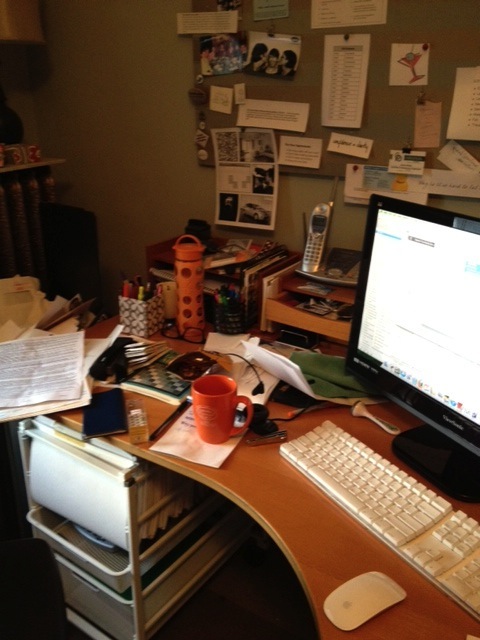
So this morning, the first thing I did when I took my computer down to my office was to set a timer and start cleaning it up. (Well, the first thing I did was take a couple of damning before pictures, see below.)
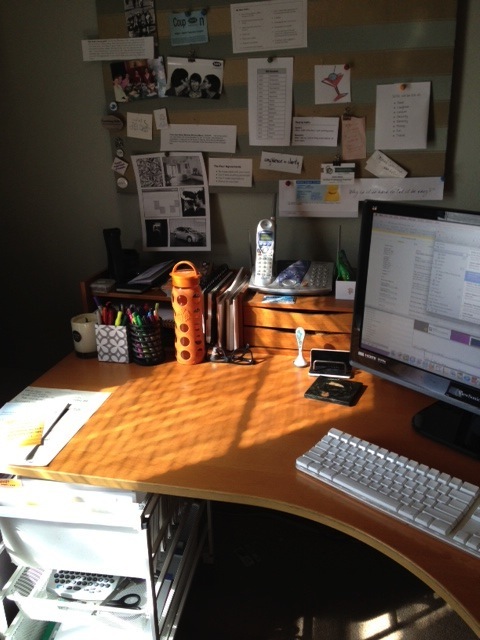
I spent 30 minutes on my desk and even got it dusted. I put stuff away, threw stuff away, looked things up that were written on random pieces of paper and really got things straight. I felt much, much better.
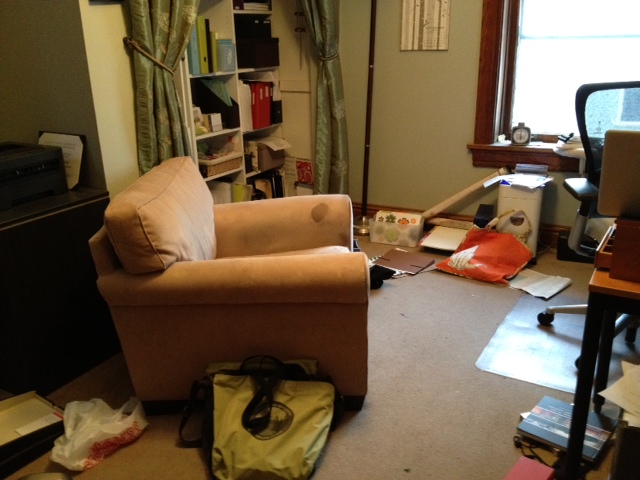
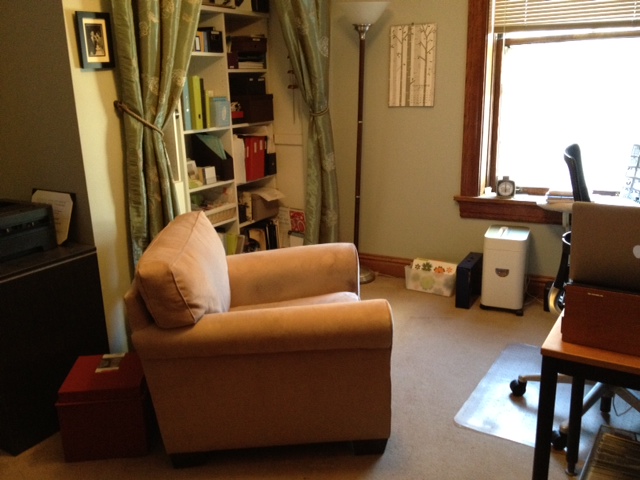
Then I focused on the floor of my office. After only 15 minutes of effort (and a couple of minutes vacuuming), things were back in shape.
The psychological benefit of that 45 minutes of work is amazing. Suddenly, I was eager to create a to-do list for the day and tackle it, rather than just feeling overwhelmed. I was even eager to go a little deeper into the straightening-process and do some filing and rethink some storage.
Yesterday, I had trouble thinking of a blog post. Today, I have three, because I found two written on the notepads I went through as I cleaned my desk. (So for once in my life, I may have a backlog!)
Since everybody loves before and after photos, I offer a couple of pairs.
Here’s my desk before I started cleaning it up.
And here it is after only 30 minutes of effort.
Here’s the floor of my office, looking ugly.
And here it is after 15 minutes of picking up, plus a couple of minutes of vacuuming.
If your desk is a mess and your mind feels cluttered, I strongly recommend taking just a few minutes to create some order. I think you’ll find it reaps huge dividends and will make you more productive.
It's Mountain Day!
I attended Mount Holyoke College, in South Hadley, Massachusetts, which has a wonderful annual tradition, Mountain Day. When Mountain Day is declared, everyone at the school gets the day off. Today is Mountain Day. Thanks to Facebook, I knew it the minute I got up and checked my computer. Three years ago, I blogged about Mountain Day. I’ve decided to re-run that post, since it’s as relevant today as it was then.
Today is Mountain Day at Mount Holyoke College in South Hadley, Massachusetts. I’m a proud member of the class of 1984 of Mount Holyoke, an august institution steeped in tradition. One of my favorite MHC traditions is Mountain Day, which first began in 1838. Once a year, on a beautiful fall day the early-morning pealing of the clock tower’s bells for five minutes let students know they are freed of academic obligations for the day. They’re encouraged to climb Mount Holyoke (which is really more of a hill than a mountain, says a person who never bothered to climb it).
It’s an exhilarating thing to be given the day off and told to go have fun. Part of the joy of it is not knowing in advance what day will be selected.
Here’s a photo of the Mount Holyoke campus on a beautiful fall day. You gotta love autumn in New England.

For the last 25 years, I’ve meant to give myself my own personal Mountain Day. I rarely have the ability to spontaneously take off the school’s Mountain Day. (The college is kind enough to email alumnae to let them know when it’s Mountain Day.) Today, for example, I have stuff I have to do because I’m leaving town in the morning. But most of those things are fun errands like shopping and a haircut. I do have a phone meeting with my Declutter Happy Hour partner Shannon Wilkinson, but that will be fun—conversations with Shannon always are.
So here’s what I’m going to do. I can’t free myself of all obligations for the day. But I can imbue the day with a happy spirit of enjoying life, which is really the essence of Mountain Day. I’ll think of all my tasks as happy opportunities, rather than obligations (which they really are).
Now here’s the question I have to ask myself: if I can do that today, why can’t I do it every day?
I think I’ll make an “Every Day Is Mountain Day!” sign for my inspiration board and see what it does for my spirits (and my day).
How about you: can you treat today (or any day) like Mountain Day?
Search
Recent Posts
- Worth repeating: Figuring out what to watch on TV
- The power of incremental progress
- Podcast guest spot on the role of organization for folks with chronic illness
- No excuses series (part 3): "It was a present"
- No excuses series (part 2): "I paid a lot for that item"
- No excuses series (part 1): "But I might need it!"
- Retiring the New Organizer Guides
Tags
About Janine

Hello! I’m Janine Adams — a certified professional organizer based in St. Louis, and the creator of Peace of Mind Organizing®.
I love order, harmony + beauty, but I believe that the way that you feel about yourself and your home is what truly matters.
If you’re ready to declutter with a purpose and add more ease to your life, you’ve found the right blog — and you’ve found the right company.
read more »Links
- Getting to Good Enough podcast
- Are you interested in becoming a professional organizer?
- Peace of Mind Spending
- Ravelry
- Shannon Wilkinson, life coach
- National Association of Productivity and Organizing Professionals
- Institute for Challenging Disorganization
- NAPO St. Louis
- Organize Your Family History