Find your family members on the 1940 U.S. Census
A census of the United States population has been conducted every year since 1790. The census results are full of great information, both on the population in general (as analyzed by demographers at the U.S. Census Bureau) and on individual residents (once results are released).
For family history researchers, the census can provide clues about one’s family history. Depending on the year (the census’ questions are revised each time), you can learn where ancestors lived, their occupations, educational status, job status, who lived with them…all sorts of great stuff.
Due to privacy concerns, individual census results are not released to the public for 72 years after the census is conducted. The release of new census results is always a cause for much excitement among those who are into genealogy. On April 2, 2012, the 1940 census results were released.

You don’t have to be a family history researcher to get a thrill from finding your parents’ or grandparents’ handwritten names and other information on the census. You can access the census results free of charge. A great starting point is the 1940 census page of the U.S. Archives website.
Eventually, the census will be indexed (as previous censuses are). Then, all you will have to do to find an individual is plug in the name and search. Now, though, you have to know the enumeration district in order to pinpoint the correct page on the census.
It’s easy to find the enumeration district if you know the address where your people lived.
In my case, my 79-year old mother remembered her childhood address. So at the Archives.gov website, I entered the state (Washington), county (Spokane), city (Spokane), street (31st). That narrowed it down to three sets of documents (over 35 pages each) to look through. Since I had her exact address, I entered it into Google Maps and was able to see that a nearby cross street is Division. When I entered the cross street, it narrowed it down to just one set of census pages. I had to look through about 24 pages of the 38-page set, but then I found it.
I discovered that my mother’s uncle was living with them in 1940, which I hadn’t realized, and that he worked as a mechanic for the city. I was reminded that my grandfather was a retail merchant who owned his own business. I learned that my mother’s brother (at least according to this census, but censuses can be wrong) was born in Georgia. I’d never, not once, heard of our family having any associations with Georgia (my mother was born in Missouri), so I’m going to have to ask my mother about this.
I had a similar experience finding my 81-year-old father on the 1940 census. He was born in 1930, but after the enumeration date, so it was the first time I’d seen his name on the census.
I love family history research, so perhaps I’m biased, but I think this is very exciting. I encourage you to take a few minutes and explore your own family in 1940. It’s free and, I think, really fun!
In praise of downtime
For the first time in quite some time, I actually had a three-day weekend. The curse of being self-employed tends to be a certain lack of downtime. When a three-day weekend rolls around, I usually see clients (because they’re available) or at the very least work at my desk at least one day of the weekend.
But this weekend, I decided to take the whole weekend off. It was tremendous. I enjoyed three long chats with girlfriends. I helped another friend organize his office. (I know that might not sound like downtime, but it was really fun.) I went to a barbecue and a farmer’s market. Yesterday, my husband and I went out to lunch.
But mostly I sat and knit and watched TV I love. (I downloaded Season Five of Mad Men and also watched back episodes of The Glee Project, which is a perfect marriage of Glee and American Idol…bliss for me.) I learned a new knitting technique, which is really exciting. I just reveled in doing very, very little.
The result? I woke up this morning ready and raring to go. I quickly caught up on email, focused on my task list, started thinking about goals. Now I’m blogging.
If I had worked this weekend, I doubt I would have been nearly as enthusiastic about getting to work today.
Sometimes you have to let your battery drain before recharging it. And that’s what I did this weekend. I literally didn’t step foot into my office. I highly recommend it.
App of the week: SleepCycle
When I was at the NAPO conference in March, one of the keynote speakers, Joanne Lichten, Ph.D., RD, aka Dr. Jo®, recommended an app called SleepCycle. She was talking about the importance of good sleeping habits for good health and self care. I had my iPhone with me, so I downloaded it on the spot, during the talk. (The app costs 99 cents.)
SleepCycle acts as a nifty alarm clock, as well as a monitor of your sleep patterns. It uses the accelerometer in your iPhone to monitor your movements while you sleep. You place your iPhone, with the SleepCycle app running, next to your pillow.
There is usually less physical movement during deep sleep. If your alarm clock goes off while you’re in deep sleep, you wake up feeling groggy. When you use SleepCycle as your alarm clock, it starts sensing movement a half hour before the time the alarm is set to go off. If you move during that window (indicating you’re not in deep sleep), the gentle alarm goes off. That way you wake up before you fall back into deep sleep. The result? You wake up refreshed, rather than groggy.
I’ve been using it more than a month and so far I love this as an alarm clock. The tone I selected is sort of new-age music and it comes on very softly. I simply pick up the phone to put it on snooze. It goes off again in a few minutes—the amount time between snoozes decreases as you get closer to your target wake-up time.
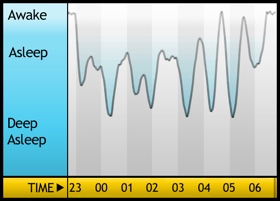
My sleep graph last night
The other fun part of SleepCycle is that gives you a graph of your sleep cycle throughout the night. It’s fascinating. I fear, though, that for those of us who don’t sleep alone it’s inaccurate. My husband is a bit of a toss-and-turner and I suspect the accelerometer is picking up his movement as well. I hope that my sleep last night was better than the graph at right indicates!
SleepCycle also shows you the time you went to bed and got up, and how long you slept. And it tells you how many hours a night you average. I average 7 hours 31 minutes over 39 nights. That makes me happy!
I love using SleepCycle as an alarm clock. It’s made getting up easier and it’s such a gentle way to awaken. (Side benefit: It doesn’t wake up my husband, who usually gets up after me.)
One downside is that the phone needs to be plugged in while it’s working. Not a problem for me…I would need to be plugging it in at night anyway. The other downside is that calls or texts could come in and wake me up, but I just put it on airplane mode.
Intrigued? Click here to download SleepCycle for 99 cents. I’m glad I did!
The blogging continues
Today marks 30 days since I took on a 30-day blogging challenge with my friend and collaborator, Shannon Wilkinson. When she was in St. Louis to hold an in-person habits and routines workshop with me, we got to talking about blogging.
I’d been doing a pretty good job of keeping up with my blogging, but my three-day-a-week blogging habit had devolved into a two-day-a-week habit. Shannon mentioned that she’d like to blog more—she knew it would be beneficial for her busines—but found it challenging to get into a good blogging routine.
I asked whether it would help if we each committed to daily blogging (five days a week). And we decided to go for it.
I knew from experience that blogging that frequently might actually be easier than blogging less frequently. And I was right. In fact, I was right about all five potential benefits to regular blogging that I outlined in my post announcing the challenge.
You know what’s great? I met my commitment. But there are so many benefits to this daily routine that I’m going to commit to sticking with it for at least another two weeks. (And perhaps beyond.)
Shannon has done an equally committed job of blogging regularly. She had a set back at the very beginning when her site was hacked (!) but thanks to the power of the commitment, she started in on the five-day-a-week blogging as soon as her site was available again. If you haven’t already done so, I urge you to check out her blog and see some of the great things she’s been writing about.
I love the power of public commitment. And I’m really enjoying all this blogging. Thank you so much for reading!
Clos-ette Too Travel Jewelry Case: Review & Giveaway!
Up until a few years ago, traveling with jewelry wasn’t much of an issue for me. I had a few pairs of earrings and a tiny (2” by 3”) little oriental cloth zipper case I put them in when I traveled. Then I met Geralin Thomas who, among her many talents, is a wardrobe consultant. She’s helped me up my game in terms of clothing and especially in terms of accessories.
So now when I travel, particularly when I travel somewhere where I’ll see Geralin (like the NAPO or ICD conferences), I bring loads of jewelry. When I saw Geralin in March, she frowned at the tangled mess of necklaces I pulled out of a jewelry roll. I don’t think she felt I was respecting them properly—and she was right.
So I was really pleased when the folks at Clos-ett Too reached out to me asking if I’d like to review one of their products and do a giveaway. I perused their website and their Travel Jewelry Case jumped right out at me.
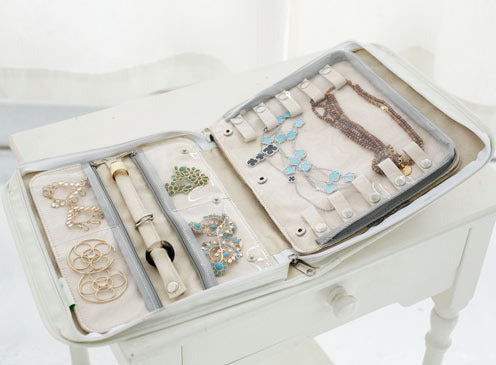
When closed, it resembles a zippered binder. In fact, it has about the same dimensions as a standard 1” three-ring binder. But it’s soft—It appears to be made of a vinyl-covered linen. Inside are two-sided “pages” lined in faux suede and covered in zippered vinyl to create compartments. (The exceptions: the ring holder isn’t covered in vinyl and the necklace has a zip-open vinyl cover.) You can travel light with just one page or bring a few. When inside the binder, they snap together.
There are storage areas for necklaces, earrings, rings, and multipurpose 4 × 4” compartments. You can buy additional pages equipped with the compartments you need, making it very versatile.
I haven’t traveled since receiving the case, but I loaded it up with the usual jewelry I travel with. I can see it has several advantages over the jewelry roll I was using:
- Necklaces won’t become tangled (which has been a huge problem for me)
- I can keep the jewelry in the case in the hotel room and easily access it
- I can see what I have!
- The open binder serves as a tray, allowing me to see two pages at a time if I’m putting on jewelry in front of a mirror
- It doesn’t look like a jewelry case, which feels good from a security standpoint
- While its footprint is a little large, it’s low profile and compact
This case is so convenient that I could see permanently storing the jewelry in pages and storing the pages in a drawer, if I had a drawer to spare. (As it is, I’ll continue using the dresser-top storage solutions I’ve worked out.)
The photos I took of my jewelry in the case look pretty unprofessional. (I need to get some sort of lighting set up to elevate the quality of my blog photos.) So I’m going to ask you to be satisfied with the above photo and the ones on their website.
Here’s the exciting part: Clos-ette Too is giving away a pink Travel Jewelry Case to one lucky blog reader! To enter, simply make a comment on this blog post. You can receive an additional entry by tweeting about the giveaway. (Be sure and use @janinea in the tweet, so that I will see it.) You can receive another giveaway entry by writing on the wall or commenting at the Peace of Mind Organizing Facebook page. The contest ends at noon, central time, on Wednesday, May 30. The winner will be notified on Thursday, May 31 and I’ll announce the winner here on the blog that day as well.
Clutter support group in St. Louis
I was recently contacted by Catherine, a member of a small clutter support group that meets in person on Monday evenings from 7 to 9 at Hartford Coffee, near Tower Grove Park, in the city of St. Louis. She wanted me to know about the existence of the group. I was delighted to hear from her, since I’m occasionally asked about local clutter support groups and didn’t know of any.
I asked Catherine for permission to visit her group, so that I could get a feel for it before recommending it to others. The group graciously permitted me to attend the beginning of the meeting and the members eloquently expressed how the peer support of the group (there is no moderator) is helpful to them. After my visit, I can wholeheartedly recommend it to folks who have issues surrounding clutter.
If you live in the St. Louis area, struggle with clutter and think you’d benefit from the no-cost, non-judgmental support and accountability this group might bring you, I encourage you to email Catherine [bransted at gmail dot com] for more information. The group welcomes newcomers. They might be switching their meeting space, so do contact Catherine before dropping in.
Don't forget labels
Labels are really important. When I work with clients to set up organizing systems, I suggest labeling as much as humanly possible. This helps the client—and the client’s family—not only find things, but them away in the proper place. That really helps in forming the habit of putting things away in a new place.
I love my Brother P-Touch labeler. (I’ve had a few…my current one is the semi-fancy PT-2030 which is right now on sale for only $20 at Staples!)
Don’t feel like you can’t make labels just because you don’t have a fancy label maker. Post-It® Notes make great temporary labels. (And they now full adhesive notes, rather than just a strip across the top.) Simple address labels, printed on your computer or by hand, can make terrific, inexpensive labels. Martha Stewart has created a line of lovely labels and tags, available from Staples. On the other end of the spectrum, masking tape and a Sharpie will work great as well!
It doesn’t matter how you label, just that you do it. And you should also pay attention to the labels. A few years back, I was waiting in my veterinarian’s exam room and my brain scrambled as I looked at these canisters.
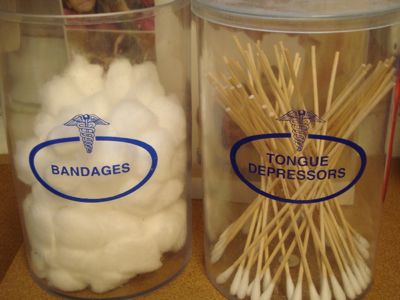
What the?
One thing to think about is that a label isn’t just a physical thing. An oral label can be very powerful as well. If you have a cluttered catch-all room that you’d like to turn back into a guest room, stop calling it the “junk room” and start calling it the “guest room.” That can be a powerful shift.
The label is the cherry on top of the organizing sundae. Don’t forget it—it might play a powerful role in helping you maintain your newly established systems.
Search
Recent Posts
- Worth repeating: Figuring out what to watch on TV
- The power of incremental progress
- Podcast guest spot on the role of organization for folks with chronic illness
- No excuses series (part 3): "It was a present"
- No excuses series (part 2): "I paid a lot for that item"
- No excuses series (part 1): "But I might need it!"
- Retiring the New Organizer Guides
Tags
About Janine
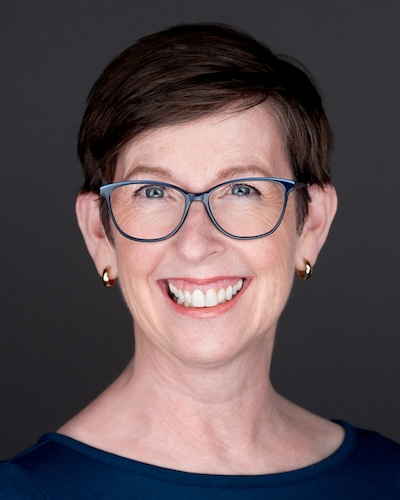
Hello! I’m Janine Adams — a certified professional organizer based in St. Louis, and the creator of Peace of Mind Organizing®.
I love order, harmony + beauty, but I believe that the way that you feel about yourself and your home is what truly matters.
If you’re ready to declutter with a purpose and add more ease to your life, you’ve found the right blog — and you’ve found the right company.
read more »Links
- Getting to Good Enough podcast
- NAPO St. Louis
- Peace of Mind Spending
- Organize Your Family History
- Ravelry
- Shannon Wilkinson, life coach
- National Association of Productivity and Organizing Professionals
- Are you interested in becoming a professional organizer?
- Institute for Challenging Disorganization