Working with an organizing team
When I started my organizing business in 2005, I exclusively worked one-on-one with clients. It’s intimate, fulfilling, valuable work. But it can be really slow. And that means progress is harder to see and it can become discouraging for the client.
A few years ago, I started to be approached by clients who had very large, whole-house decluttering jobs. I realized that bringing in more help was in order. And so every now and then I would put together an organizing team to effect quick change on giant projects.
In the last year or so I realized that it wasn’t just huge or overwhelming projects that could benefit from a team approach. As the long as the client can handle the hubbub and the faster pace of a team, there are many benefits, not the least of which is the visible results we see after a single session.
I don’t have employees. When I put together an organizing team, I use independent contractors, members of the St. Louis chapter of the National Association of Professional Organizers. I call on organizers I know personally, thanks to NAPO St. Louis. I’m always on site supervising them and coordinating the efforts. I’m also typically the one working with the clients to guide decisions.
Here are some of the advantages I have found to team organizing:
- We get a whole lot done. If I’m working one-on-one with a client, I not only guide the decisions, but implement them. When I’m working with a team, there’s someone to do the leg work and everything happens a whole lot faster. Also, the team members pre-sort items for the client before the keep/donate/toss decisions are made (in a decluttering situation), which makes the decision-making much easier. As a result, the client sees visible progress, which isn’t always the case after a one-on-one session.
- It’s economical. I charge less for the time of organizing team members than I charge for my own time. So bringing in a team is not only faster than working with me one-on-one, it’s less expensive.
- More minds are better than one. I populate my teams with smart and talented organizers. I’d be crazy not to tap into their considerable skills and knowledge on the job. While I’m working with the client, I frequently consult team members on the best way to approach or organize a space. So the client benefits from the cumulative knowledge of the group.
- It’s fun! All the organizers I use love working on teams. Doing work we love (sorting and organizing) alongside our colleagues practically makes us giddy. And that’s contagious. While it’s tiring for the client to make a lot of decisions in a short period of time, most confess to having fun while doing it during our team jobs. Time flies.
Here’s a before and after combo from a team job at the end of 2010. Two of the organizing team members worked in this kitchen while the client worked with me and other team members in another part of the house. The client gave basic parameters and was brought in to answer questions periodically. She was thrilled at the end of the day.
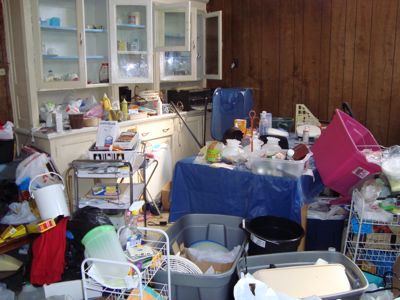
A cluttered kitchen before a team arrived to help.
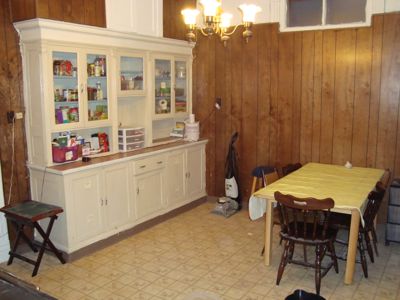
Two organizers created this transformation as part of a team project.
This year, my goal is to help more clients this way. I’m hooked on the fun of the team approach and the quick results. If you have a big project that seems overwhelming, maybe I could bring in an organizing team to help you. Take a look at my Team Organizing page to read a few more details. Then feel free to give me a call or shoot me an email to discuss how a team might help you!
Store things near where you use them
One thing I always tell my clients—and I mention it when I give talks—is that it makes life a lot easier if you store items near where you use them. If you select a distant place to store stuff, it gets that much more difficult to put things away when you’re through with them.
Here’s the example I use in talks to illustrate this important principle.
My husband I are dog lovers, accustomed to having a pair of standard poodles (though right now we have just one). Our poodles have a complete wardrobe of leashes and collars, passed down through the years and supplemented by absolutely gorgeous ones from my friends at Paw Paws.
When we first moved back into our house in 2001, I decided we should store our leashes and collars in a hanging shoe organizer in the coat closet. Because our house is old and odd, however, the coat closet is probably 25 feet away from the front door we use. Right next to that front door is a table.
So I bet you can guess what happened: Rather than walk 25 feet to put away the leashes and collars after a walk (our dogs go naked in the house), we had a natural tendency to put the collars and leashes down on the table just inside the door. For a little while, I tried to put them away properly and I tried to get my husband to do the same, but it really made a lot more sense to just put them down right next to wear we use them.
So I stopped getting frustrated and instead got a basket. I put it right under the pile of leashes and now they’re contained. The messy pile is gone and a basket is in its place. And heaven knows how many minutes have been saved over the last ten years!
A great take on hiring a professional organizer
I think one of the biggest barriers organizers face when it comes to getting clients is that getting organized, or being organized, is something that people think they should be able to do on their own. They don’t acknowledge that it’s naturally easier for some people to be organized than others. And that you can save a lot of money and time in the long run when you hire a professional organizer.
I gave a talk yesterday with life coach Jill Farmer for the Academic Women’s Network at Washington University School of Medicine. During that talk, Jill made an absolutely genius analogy.
She shared this dialogue, which took place when she suggested that a coaching client hire a professional organizer.
Client: Oh no, I can get organized myself.
Jill: Can you walk?
Client: Yes…
Jill: Then why do drive to work if you can walk?
Client: A car makes it easier and more efficient to get to work.
Jill: A professional organizer makes it easier and more efficient to get organized.
I love it!
Bingo works for me!
I wouldn’t be writing this (or any) blog post today if it weren’t for To-Do List Bingo. At the end of the day today, I took a look at my bingo board and covered the tasks that I had already done.
I discovered that I can get a double bingo (!) today if I write a blog post. So that’s what I’m doing. I am now experiencing the thrill of a bingo.
As you can see, To-Do List Bingo is very motivating for me. It gets me to do important-but-not-urgent things that I wouldn’t otherwise do. For me, getting a bingo is a great reward.
If you’re intrigued by the notion of what might seem like a childish game making you more productive, you might want to check out my Organizing Guide, Making Tasks Fun with To-Do List Bingo. (All my concise organizing guides—downloadable pdfs—are $9 each but right now I’m offering a buy one, get one free deal with the coupon code GUIDEME.)
Special thanks to Jacquelyn Kittredge of e-bakery social media for inspiring me to create my first bingo board!
A fabulous opportunity for personal growth
My friend and life coach Shannon Wilkinson is going to turn 45 in a little while. (Hard to believe when you look at that picture, isn’t it?) To put a positive spin on this milestone (which puts her into a different age group and jacks up her insurance rates), she’s doing a series of challenges related to the number 45. You can read all about it on her blog. In brief, between now and her birthday in mid-March, she’s exercising for 45 minutes, 45 times; she’s being still for 45 minutes, 45 times; she’s leaving 45 random love notes; and (here’s the part that could affect you), she’s offering to coach 45 people in 45-minute laser-coaching sessions for $45.
Shannon is an amazing coach who uses NLP techniques and hypnosis to create transformational internal shifts. I can tell you from personal experience that a single session can be life changing. I know that sounds like hyperbole, but it isn’t.

So here’s your chance, for the small investment of only $45, to work through a challenge you’ve been trying to resolve. If you ask me, it’s the deal of the century. Oh, and one other great aspect of it: Shannon is giving $4.50 of every $45 session to fund microloans through Kiva.
Tempted? Go to Shannon’s website to read all the details and sign up now.
Incidentally, on her blog Shannon is reporting on her progress with her challenges. I love that she’s using Joe’s Goals to track everything brilliantly. It’s a great use of that free service. Check it out.
Low-cost ways to tap into my expertise
I love working one-on-one with clients (and I also love supervising a team of organizers to help clients) and we get great results. But sometimes budgetary or geographic constraints make that impossible.
That’s why I’m glad to bring up some opportunities for ways you can tap into my expertise even if you’re on a budget and/or you don’t live in St. Louis.
You can hear me speak
Mom’s Blast Off I’ll be participating in the Mom’s Blast Off workshop on February 24, where I’m joining life coach Jill Farmer and social-media expert Allison Collinger in a three-hour event designed to help you launch your best year ever. All this for $49.
Letting Go of the Tough Stuff I’ll be teaching a 90-minute class at the Thomas Dunn Memorials in south St. Louis on February 28 on how to let go of sentimental and other objects that might be cluttering up your life. The cost for the class is only $10.
You can take my online workshop
Simplify Your Life with Habits + Routines I’m absolutely delighted to be teaching this online workshop once again for simplify 101. The three-lesson, four-week workshop will help you create beneficial habits and routines and let go of bad habits. The special sauce of these workshops is the online forum, where your can interact with the instructor (me!), along with your to get accountability and support, which is so important with habit creation. The cost is only $59 and if you register today it’s an even better deal at $47.20. (The early-bird registration ends today.)
You can purchase one of my Organizing Guides
Organizing Guides I wrote these concise pdfs after hearing the same sorts of questions from my clients over and over. I wanted to give them something in writing to answer their questions. When you hire me to work with you, you get certain guides free of charge. But you can also download them on their own for $9 each. Right now, through the end of February, I’m offering a buy one, get one free special. Use the coupon code GUIDEME to get an instant $9 off when you buy two or more guides.
You can take one of my e-courses
Make Peace with Your Mail Most of my clients have difficulty dealing with the onslaught of mail that comes into their lives. I created an e-course that uses printed and video lessons to help you learn how to get (and stay) on top of your mail. The price is $59 but I’ll let you in on a little secret: the GUIDEME code will also get you $9 off the e-course if you purchase it separately.
Declutter Happy Hour I created this e-course with life coach Shannon Wilkinson as a way to help folks get past the emotional barriers to decluttering and actually get the job done. Shannon helps you with the emotional stuff and I help you tackle the physical side of decluttering. The course is presented as a series of audio lessons, along with daily emails for 28 days to inspire and motivate you to keep up the good work. The price? $97 for the core course/$127 for the premium course.
Terrific new donation resource
My friend and colleague, Sue Anderson of Simplified Living Solutions, a fellow professional organizer here in St. Louis, has created a really terrific resource for folks wanting donate unwanted items.

The Stuff Stop is a website that lists worthy charities who are seeking donated items and what they’re after. Sue’s who has a passion for connecting people’s unwanted stuff with people who need stuff and creating this site is a dream come true for her. The site debuted just last week, but it’s already chock full of great resources and it promises to get even better as more item-needing charities are added.
Post are tagged by item category as well as location, so you can click on “Missouri” for example, and see all the Missouri-based charities. Or you can click on “Glass Bottles” and see that there are two charities listed that are interested in glass bottle donations. (Who knew?)
If you’re looking to declutter and would like to donate some of your unwanted belongings, this is a great place to find folks who would really like your stuff.
Bravo to Sue for following her dream and creating this great resource!
Search
Recent Posts
- Worth repeating: Figuring out what to watch on TV
- The power of incremental progress
- Podcast guest spot on the role of organization for folks with chronic illness
- No excuses series (part 3): "It was a present"
- No excuses series (part 2): "I paid a lot for that item"
- No excuses series (part 1): "But I might need it!"
- Retiring the New Organizer Guides
Tags
About Janine

Hello! I’m Janine Adams — a certified professional organizer based in St. Louis, and the creator of Peace of Mind Organizing®.
I love order, harmony + beauty, but I believe that the way that you feel about yourself and your home is what truly matters.
If you’re ready to declutter with a purpose and add more ease to your life, you’ve found the right blog — and you’ve found the right company.
read more »Links
- Ravelry
- Getting to Good Enough podcast
- National Association of Productivity and Organizing Professionals
- Shannon Wilkinson, life coach
- Organize Your Family History
- NAPO St. Louis
- Are you interested in becoming a professional organizer?
- Institute for Challenging Disorganization
- Peace of Mind Spending