Great shirts for pet lovers
This weekend I’m once again going to the H.H. Backer Pet Industry Christmas Trade Show and Educational Conference in Chicago to help my friend, Sally Brown, with her booth for her company, Roll Over Rover Threads She sells t-shirts with dog and cat themes and at this show will be introducing tote bags and other products.

This is the fourth Backer show I’ve been to with her. Now, I’m not a trade show kind of gal. Being stuck in a booth is usually my idea of torture. But I don’t want Sally to have to do it alone and we have a great time. But the best part is I really believe in her products. They’re beautiful and high quality and I love selling them.

So I thought I’d start today. Please go to the Roll Over Rover Threads website and look at her witty and sophisticated designs. Sally’s such a great illustrator and comes up with all the ideas herself. Once you’ve decided that you’d like to buy one, you can go to her list of brick and mortar pet boutiques to see if there’s one near you. Or you can order online from The Uncommon Hound, which carries her whole line.

These shirts make a great gift for your dog- and cat-loving friends. What I love about them is they’re not overly cute, just really attractive and smart.

This is just a small sampling of her designs. Please go to her website to check them all out.

P.S. Isn’t her website beautiful? It was designed by Nora Brown, Sally’s niece, who also designed my website.
Take five
I love to extol the virtues of grabbing pockets of time and creating order on a small scale. This is something I tell my clients and my Declutter Happy Hour participants.
My colleague in Houston, Ellen Delap, CPO® clearly agrees. Her blog post today carries a happy list of five organizing projects you can do in five minutes.
If you have five minutes right now to organize, click on over there, take a minute to read her post, set your timer for five (or four) minutes and see what a difference you can make.
Thanks for the inspiration, Ellen!
NSGCD announces new name
I’m just back from the annual conference of the National Study Group on Chronic Disorganization, held in Austin. As usual, it was educational, energizing and inspiring.
At the conference, the new name for the NSGCD was announced. Starting January 1, 2011, the organization’s name will be:
Institute for Challenging Disorganization (ICD)
The tagline for the new name is Education. Research. Strategies.
As a board member and a late-to-the-party addition to the Name Change Steering Committee, I was privy to the challenges of renaming this organization. The new name is based on data collected through focus groups and surveys.
Change can be tough, but I think this is an exciting one. As Marketing Director, I’ll be working hard on the transition to the new name in the coming half year or so.
One thing I can say for sure: ICD is a much easier to say (and remember) acronym than NSGCD!
Nine things I love about the iPad
My three-year-old cell phone came to the end of its life recently, so I bought an iPad. I realize that doesn’t make a lot of sense on the surface, since the iPad isn’t a phone. But when it came time to contemplate a new phone, I realized I wanted the productivity of the iPhone (that is, I wanted to be able to access the internet when I’m out and about without relying on a wireless connection), but I didn’t want to sign a contract with AT&T and I also craved a larger screen for my middle-aged eyes.
So I bought a less-than-smart replacement phone similar to the one I’d had and ended up with a 3G iPad and wireless keyboard. It’s just been a couple of weeks, but I am loving it.
In the spirit of why I love my iPod Touch, a post I wrote in 2008 when I bought my iPod Touch (which I still love and use), here are nine things I love about my new iPad.
1. I can access the internet anywhere. With my iPod Touch, I have to have a wireless connection to use the Internet. With the iPad, I pay a monthly fee for a cellular data connection. So as long as there’s cell service, I can log on.
2. The screen is quite large. And really crisp. Reading a website on a smartphone can be difficult. But the iPad’s display, at 9.7 inches, isn’t that much smaller than my MacBook’s.
3. The larger screen allows for touch typing. It’s not perfect, but it’s so much easier to type on the touch screen of the iPad (particularly in landscape mode) than it is on the iPod Touch. That said, typing longer emails or other written documents can be painstakingly slow, which is why I spent an extra $70 on…
4. The wireless keyboard. Small and light, it connects automatically via bluetooth with the iPad, making it almost as functional as my MacBook and so, so much more portable. I also love that the iPad is fully functional without the keyboard, so I don’t have to carry it if I don’t want to.
5. The apps. I love the apps. Since iPhone/iPod Touch apps work on the iPad, I was able to transfer the apps I’d already downloaded. And there are a growing number of apps written specifically for the iPad. I’m using more work-oriented apps like Dropbox and Evernote, but I also enjoy the games. (My current favorite is Word Scramble, a Boggle-like word game.)
6. The photo display. I’ve already loaded some before and after photos on my iPad, which I think will be inspirational to clients. They show up so large and clear on the screen that they have a real impact (as opposed to, say, squinting at the display on my digital camera).
7. The portability. This thing is so light (1.6 pounds) that if I don’t have the keyboard with me, I barely notice that I’m carrying it. And the keyboard adds just 14 ounces.
8. Synchronicity. I already use MobileMe to synch my computer with my iPod Touch. After just a couple of minutes of set up, I was synching my iPad as well. So no matter which device I’m using (MacBook, iPad, or iPod Touch), I have the most current info for my calendar and contacts, as well as my latest emails, right in front of me. And the synching is automatic and wireless. That’s a great thing.
9. The plethora of accessories available for the iPad. Even though it’s only been around for five months, the iPad is so insanely popular that accessories have sprouted up like mushrooms. I can find anything I might desire for it (cases, bags, stands, you name it) — and chances are really good that the accessories are stylish.
My only challenge at the moment is finding just the right bag to replace my purse, which isn’t large enough for the iPad. I want to find a bag that will hold the iPad and the wireless keyboard when necessary. But that’s a fun challenge.
Setting the bar low
I’m all for doing things well and keeping commitments. But sometimes, just a little bit of effort is better than no effort. And sometimes if you make a little effort, it can turn into more effort.
Case in point: I’m working with a friend and accountability partner to try to get back into the routine of doing Wii Fit Plus on a regular a basis. I’d lost that routine during a particularly busy time. And I’m hanging onto a couple of pounds as a result. So I committed to 20 minutes of Wii Fit a day, five days a week. I know, it’s not much. But it’s something and that’s better than nothing.
Well last night I just didn’t feel like doing it. I had time, I wasn’t exhausted, I just didn’t want to. But I knew I was going to have to tell that to my accountability partner. And I knew how important it was to just do a little in order to create that habit again.
So I told myself that I would do five minutes on the Wii Fit. That’s all. Just five minutes That didn’t seem too bad. So my interior whiner was placated. Once I got started, I had no problem doing the full 20 minutes.
This reminds me of Mark Forster’s trick of fooling your reactive mind by telling it you’re just going to do one little step. (“I’m not going to vacuum, I’m just getting out the vacuum cleaner.”) Once you do that first step, the resistance is gone and you do the task. I blogged about this in a June 2008 post called Getting Started.
So next time you find yourself resisting something that you feel you really ought to do (decluttering, for example), try lowering the bar. Tell yourself you’ll do it for an incredibly short period of time. Even if you stop after that short interval, you’ll have made some progress. And chances are good that you’ll actually keep going.
The cost of keeping stuff
I gave a talk this week called Letting Go of the Tough Stuff. One of the points I made in that talk is something I’ve been thinking about a lot lately. Many clients don’t like to part with items they don’t use or love because those items cost a lot to buy. Or they feel the item is worth something and they can’t just give it away, but selling it feels too complicated or labor-intenstive, so it gets put off.
When I’m working with a client with a big clutter problem they’re trying to resolve, I like to point out that there’s a cost associated with keeping those items. When you’re dealing with a lot of clutter, keeping stuff you don’t use or love can have the following costs:
- A physical cost. If you can’t dust because of the clutter, it can affect your health. If you can’t let in a repair person or get to the furnace to service it, your house might be paying a physical cost as well.
- A monetary cost. If you’re paying your bills late because you can’t find them amidst the paper, you’re probably paying higher interest rates on top of late fees. If you’re buying duplicates of things because you can’t find the ones you have, that’s costing you money. And if you’re paying for storage? That’s a quite literal example of how keeping your stuff can have a monetary cost.
- An emotional cost. For many people, major clutter leads to guilt, shame and self-recrimination. Every time you look around you feel bad. If you’re hanging on to items that remind you of a bad time in your life (relics of a divorce for example), there’s an emotional cost as well.
Next time you’re tempted to keep something because it cost a lot, think about the costs of keeping it. Letting go of items you don’t use or love can be very freeing!
You can get more advice on letting go by purchasing my Organizing Guide, A GENTLE GOODBYE: how to let go of the stuff that’s holding you back. (Scroll down through the list of Guides to see it.)
I love my timer
I’ve been keeping sort of a crazy schedule for the last week. Lots of work outside the home, lots of phone time at home, quite a bit of fatigue. The result is that my email inbox, which I usually try very hard to keep under control, has grown and grown.
As I’ve mentioned before, my friend Aby Garvey and I provide accountability to one another to keep our inboxes down to 15 or fewer messages at the end of the day. This week, I just emailed her and told her that I wouldn’t be able to do anything about my inbox until Friday.
Here it is Friday morning. I’d been glancing at email throughout the week, but not taking a whole lot of action with it. So I had a couple of hundred messages in there, most of them needing reply. I felt overwhelmed. But I knew I had to tame it.
So I set a timer. My timer of choice is the Time Timer, which gives a visual representation of the passage of time. I use the plastic one at clients’ homes sometimes. And when I’m at my desk, I use the electronic version. Here’s a photo:
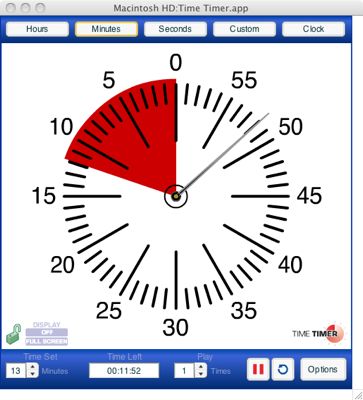
I set my timer for 13 minutes, because at the end of 13 minutes I’d be at the top of an hour. Knowing that I was putting my nose to the grindstone and focusing on email for that period of time helped me push on without thinking about taking a break and without getting distracted by other concerns.
I had to do two of these timed bursts as time-management guru Mark Forster calls them in order to get my email inbox trimmed to about 20 emails that I’ll get to throughout the day.
Breaking big projects down into small tasks, or working on projects for small bits of time is a great way to fight feelings of overwhelm. And a timer can be your best friend when you’re going for those timed bursts.
Next time you’re feeling overwhelmed, grab a kitchen timer and get to work on part of the thing that’s overwhelming you, even if it’s only for ten minutes. The timer helps you focus. And it’s amazing what you can do when you focus.
Search
Recent Posts
- Worth repeating: Figuring out what to watch on TV
- The power of incremental progress
- Podcast guest spot on the role of organization for folks with chronic illness
- No excuses series (part 3): "It was a present"
- No excuses series (part 2): "I paid a lot for that item"
- No excuses series (part 1): "But I might need it!"
- Retiring the New Organizer Guides
Tags
About Janine

Hello! I’m Janine Adams — a certified professional organizer based in St. Louis, and the creator of Peace of Mind Organizing®.
I love order, harmony + beauty, but I believe that the way that you feel about yourself and your home is what truly matters.
If you’re ready to declutter with a purpose and add more ease to your life, you’ve found the right blog — and you’ve found the right company.
read more »Links
- Organize Your Family History
- Institute for Challenging Disorganization
- Shannon Wilkinson, life coach
- Are you interested in becoming a professional organizer?
- Getting to Good Enough podcast
- Peace of Mind Spending
- NAPO St. Louis
- Ravelry
- National Association of Productivity and Organizing Professionals