Organizing nirvana
Checking in for a quick moment to say how wonderfully fortunate I feel to be at the national NAPO conference here in Reno. I just heard the most wonderful keynote address from Peter Walsh, who totally rocks. Here’s a nugget: When people buy stuff, they’re buying not only the stuff, but the promises of the stuff. (The pants that promise to make you look thin; the cookware that will suddenly make wholesome family dinners happen.) So their homes are not only full of stuff, they’re littered with broken promises. Wow.
I’m off to check out the Expo (the trade show). I dashed in at lunch time, visited the Container Store booth and won a $25 gift card by drawing a lucky chip out a barrel. Maybe my next stop should be the slot machines!
I’m so in my element, surrounded by wonderful organizers, many of whom are old friends with lots of new acquaintances made. And I have to give a shout out to my friend Geralin Thomas, of Metropolitan Organizing in Cary, N.C. who helped me put together outfits so I can feel confident and fabulous.
If you know me, you might be shocked to know that I’m planning to wear a dress and boots (!) on Saturday. Such is the power of Geralin….
I'm off to learn something
I leave today for Reno, Nevada, to attend the national conference of my professional organization, the National Association of Professional Organizers. This is my third national NAPO conference in as many years and I’m very excited.
Eight or nine hundred organizers gather together to network and to learn from the fabulous variety of sessions that are offered. Peter Walsh, of Oprah fame (and author of the new book Does This Clutter Make My Butt Look Fat?, is giving the keynote address. And there’s a great trade show. Man, I’m in heaven at the trade show.
One of the best parts of the conference is seeing friends from around the country and making new ones. I’ll try to share websites and insights from some of the fabulous organizers I talk with.
I’ll have my computer with me and I’ll try to keep up blogging while I’m away. But if I miss a day (or five) you’ll know why.
A couple of shopping tips
My husband and I have just one TV. I take perverse pride that our marriage has survived 18 years with only one television. And I’m a big TV watcher. TV + knitting = a very good time for me.
A week ago, our 14-year-old Panasonic 32” TV bit the dust. It had been threatening to die for a few months, so the sadness of its death was tempered with the excitement over the prospect of buying a modern TV. I was anxious to get one that didn’t weigh 150 pounds and take up so much space.
Our DVD player died a few months ago. I’ve been meaning to buy a DVD recorder to replace it, so that I could copy extra-good shows off our beloved DVR onto a disc. But I was having trouble finding the time to research the best machine and buy it. (And I was watching DVDs on my computer in the interim.) Since we had to go to an electronics store to buy a TV, we decided to also get a DVD recorder.
Here’s where my tips come in. I did some research on Consumer Reports, where you can buy a subscription for a month for $5.95. We decided on a TV, based on the Consumer Reports recommendations. It was a Best Buy house-brand (Insignia) TV. I went to Retail Me Not and found a printable coupon for 10 percent off my purchase. I found two, actually, and printed both of them.
So Saturday morning we set off to Best Buy. Where we live, there’s a Circuit City near the Best Buy. My husband wanted us to go to both stores, to comparison shop. That seemed crazy to me since (a) we knew we wanted a Best Buy TV, (b) we had a 10 percent off Best Buy coupon, so it seemed unlikely that we’d find a better price at Circuit City, (c) I hate electronics stores and (d) I was in a hurry to get over to my best friend’s house to help her celebrate her birthday. But I conceded that it was logical to comparison shop. And, as is so often the case, Barry was right.
We checked out the TVs and DVD recorders and Circuit City and proceeded to Best Buy. We made a beeline to the TV we knew we wanted and discovered that the quality of the picture was pretty lousy (though the price for the size was good). So we decided on a smaller (32-inch) Samsung HDTV with a great picture for the same price as the 37-inch Insignia HDTV.
In looking at DVD recorders, I found the Sony that I’d decided on and discovered that it was $30 cheaper at Circuit City. All I had to do was mention that price difference to the Best Buy salesperson, who verified it on the web and gave me the lower price.
So the shopping tips are these:
- Even if you don’t subscribe to Consumer Reports magazine, you can get the benefit of their buying advice for an investment of only $5.95 (just remember to cancel the membership by month’s end).
- Don’t take Consumer Reports words for it, though. Check out the product yourself.
- Always check online for a coupon before heading out to the store.
- Comparison shop so that you can get the best price, even if the store you’re in doesn’t offer that price.
We’re very fond of our new TV. One of its best features is that it swivels on its base, so we can angle it just so, depending on who’s watching and where they’re sitting. I’m hopeful it’ll be another 14 years before I have to buy another one!
Shredder lust
Inspired by this thread on Unclutterer, particularly the great comments, I lingered in the shredder section of Office Depot yesterday. I found one I liked (but don’t need) but it’s not available online, so I can’t show it to you.
But check out this nice-looking Black and Decker shredder-, which was recommended by a commenter in the Unclutterer entry (and called “sexy” by other commenters).
What I like about this shredder is its low profile. I love that it’s stored sideways, so it can be tucked between a desk and something else. I like that the receptacle is a pull-out drawer. I like that it comes in red. What I don’t like about it is that it accepts only five sheets at at time.
The one I saw at Office Depot is a medium-duty shredder quite similar to this one, only in black and with a CD slot. It too is parked sideways and has a drawer. It’s wider, however.
In looking around at shredders, I found an innovation I hadn’t seen before. It’s the under-the-desk shredder, whose mouth is on the front, rather than the top, of the machine. I love that idea. This particular one is heavy-duty (it takes 18 sheets), with a heavy-duty price of $280.
Since I’m all about shredders this morning, I have a couple of shredding-related tips. One is something I do at home to try to make emptying the shredder less messy. I have a light-duty shredder that fits over a mesh wastebasket. To empty it, I lift off the top and empty the basket. That always shreds on the floor I needed to vacuum up. I hate vacuuming, so I bought a pretty wooden tray that my shredder rests on. When I go to empty it, I lift off the top, move the basket and set the top on the tray while I empty the basket. Then I replace the top and tip the tray into a garbage can to get rid of the stray shreds. Sure beats vacuuming!
The other tip comes from a clever client who uses her shreds to start fires in her fireplace. Easier than wadding up newspaper and convenient, since shreds are always available. It’s a belt-and-suspenders approach to preventing identity theft.
Meet Joe, the biggest challenge to my morning productivity
Each morning when I’m writing my blog post one of the biggest impediments to my actually accomplishing that task is Joe, my orange tabby cat.
Here he is, looking all sleepy and innocent:
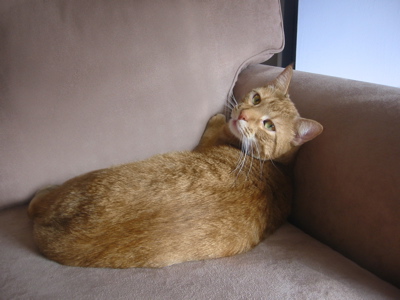
Joe, awakened from a catnap
He tends to be quite loving in the morning. He loves me, but he especially loves my cozy-yarn bathrobe. So as I type, he’s frequently on my lap, kneading my shoulders and generally making it difficult for me to work. To show his love for me, he’ll bite my clavicle. That makes it hard for me to find the flow when I’m writing.
When he’s not on my lap, he’s rubbing up against my flat-screen monitor, pushing it askew with his cheek. He also enjoys walking across my keyboard. He’s actually been known to highlight and delete whole documents. (Once he walked across the keyboard, deleted the words on the screen and typed the word “hi”. I’m not kidding.) Again, an impediment to good writing.
Luckily, he’s very cute, especially when he’s asleep. I can’t resist sharing this photo of Joe and Pip, one of our standard poodles, in a rare nap together.
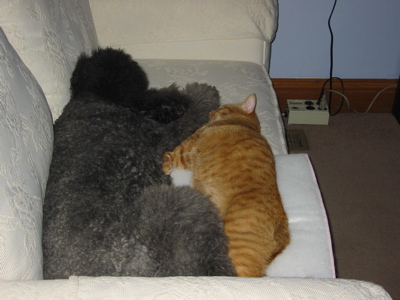
Joe napping with his poodle sister, Pip
The morning rush
I’m a punctuality-challenged person. That’s not a great trait for a professional organizer. My clients have an expectation that their organizer will arrive on time. And besides, it’s just good business to be respectful of your clients’ time.
Here’s the thing. In my case, it’s not that I lack a sense of time. I know pretty much at any given moment what time it is, within five minutes. I make a game of guessing the time before I look at my watch and I’m almost always within five minutes of being right. Heck, I sleep in my watch, I depend upon it so much.
And it’s not that I’m a lazy bones who can’t get out of bed. I’m a morning person and I pretty much get up at the time I determined the night before. (I do use the snooze button, but I build that snoozing time into my calculation of what time the alarm should go off.) I get up a solid three hours before my appointment time.
No, my problem is that I try to cram too many things into my mornings, before I leave the house. Each morning, I try to calculate what time I need to be in the shower in order for me to shower, put on makeup, get dressed, and walk each of my two standard poodles (separately) before I have to gather my things and leave.
It’s a good system, except that what I’ve found is that I try to do too many things in the time between when I sit down at my computer with a cup of coffee (by that time I’ve done my morning routine) and when I get into the shower. I look at the blogs that are important to me. I write my own blog entry (most mornings). I answer some emails. Time just zips by and it’s hard for me to pull myself away from the computer.
I’ve actually been working on my punctuality this year (Joe’s Goals has helped). Things have improved. However, I’ve had the experience lately of being late because I misremembered my appointment time. This has happened twice in the last month. That’s unforgivable. I also had an experience in February where I forgot to take with me the Freedom Filer kit that the client had hired me to implement for her. Luckily, she was extremely understanding and we put our time together to good use. I came back the next day (at no additional charge) and worked with her on the filing system.
If that’s not a big enough clue that I need to do things differently, I don’t know what is. So I’m instituting some new policies and procedures here Peace of Mind Organizing HQ.
My husband is a pilot. He flies motorless aircraft, aka gliders. (If you live in the St. Louis area and want to arrange to experience motorless flight, his club, Silvercreek Glider Club offers glider rides.) He’s explained to me on several occasions how pilots are required to go over their checklist, out loud, prior to taking off. Each and every time.
Checklists are now in my future. My plan is that after I’ve finished cleaning off my office desk each evening, and while I’m putting together my task list for the next day (a la Do It Tomorrow), I’ll put together a checklist of the things I need to take with me on my next day’s appointments. I’ll allow myself to leave that sheet of paper on my clean desktop. In addition, I’ll check my calendar for appointment times and calculate my pre-departure schedule for the morning and leave that on the desk. No more late appointments. No more forgotten supplies.
That’s the plan. If I slip up, I’m lucky enough to have the nicest, most understanding clients. They realize I’m human (I make that abundantly clear). But I hope not to have to count on their largesse much longer.
Perils of a new alarm clock
I got a new alarm clock recently, and I really like it. It allows me to wake up to a CD (right now, Lyle Lovett) and its snooze interval is six minutes rather than ten.
But it’s a little tricky when it comes to changing the time the alarm is set to go off, particularly if it’s dark in the room because someone’s already asleep and particularly if you’re bleery eyed because you fell asleep on the couch with a cat in your lap. That was me last night. The result? The alarm didn’t go off this morning and I ended up getting up a full hour late.
It’s been quite some time since this happened, but the panicky feeling I had when I jumped out of bed was familiar. I have a new client this morning, so I can’t be late.
Luckily, I took a shower yesterday evening and, miracle of miracles, my hair doesn’t look slept on. So I can forego the morning shower. I think I can get my husband to walk one of my dogs. But I can’t get him to write a blog post for me, which is why this one is going to be short.
The lesson? I’m not going to switch my wake-up time. I think I’ll set a time and stick with it for weekdays. The alarm clock has two alarms, so Alarm 2 can be the one I switch around on weekends. But on a normal weekday, I’ll simply have to touch the Alarm 1 button to set it to wake me at my usual time.
Gotta dash.
Search
Recent Posts
- Worth repeating: Figuring out what to watch on TV
- The power of incremental progress
- Podcast guest spot on the role of organization for folks with chronic illness
- No excuses series (part 3): "It was a present"
- No excuses series (part 2): "I paid a lot for that item"
- No excuses series (part 1): "But I might need it!"
- Retiring the New Organizer Guides
Tags
About Janine

Hello! I’m Janine Adams — a certified professional organizer based in St. Louis, and the creator of Peace of Mind Organizing®.
I love order, harmony + beauty, but I believe that the way that you feel about yourself and your home is what truly matters.
If you’re ready to declutter with a purpose and add more ease to your life, you’ve found the right blog — and you’ve found the right company.
read more »Links
- National Association of Productivity and Organizing Professionals
- Ravelry
- Institute for Challenging Disorganization
- Shannon Wilkinson, life coach
- Are you interested in becoming a professional organizer?
- NAPO St. Louis
- Peace of Mind Spending
- Getting to Good Enough podcast
- Organize Your Family History