Organizing wisdom from the Expo
As I’ve posted here, the St. Louis chapter of the National Association of Professional Organizers (NAPO-STL) sponsored an organizing expo for the public on March 23. It was over a year in the planning and all that planning showed. The event was a great success, with every detail anticipated. It ran so smoothly. I was extremely proud of our chapter. We had great participation!
The speakers were terrific. Over 100 audience members heard five great talks. (I was honored to be one of the speakers, covering garages and basements.)
Here are some of the nuggets I gleaned, one per speaker. (I included one of my own for the sake of completeness.)
- When you’ve decided to discard a piece of paper, tear it in half so that you don’t have to rethink that decision. — Julie Hough, The Ordered Home
- As far as the IRS is concerned, there’s nothing special about scraps of paper. Electronic/scanned documents work just as well. — Carolyn Conboy, Org4U
- Start small when deciding where to start decluttering. A single shelf, a single drawer or cupboard, something doable. And make it an area that’s high impact, if possible. — Janine Adams, Peace of Mind Organizing
- If an app doesn’t work for you, delete it. — Jennifer Stewart, Organizing by Jennifer
- Goals need to be reasonable or they’ll make you feel like a failure. If a goal is too aggressive for your best friend, it’s too aggressive for you. — Denise B. Lee, Clear Spaces LLC
Incidentally, I created a garages and basements Pinterest board to share some organizing solutions for those areas. If you have a garage or basement in need of organizing, you might want to check it out.
Simplicity to the extreme
The current (April 2013) issue of Martha Stewart Living features an article about Bea Johnson and her family. This family of four—Bea, her husband, and two school-age sons—embraces simple living and reducing waste to the point that they produce two handfuls of trash each year.
That was enough to make me sit up and take notice.
I wish the article, written by Rory Evans, went into more depth on Bea’s strategies. But what’s there is very interesting. The good news is that Bea Johnson has written a book, called Zero Waste Home: The Ultimate Guide to Simplifying Your Life by Reducing Your Waste
Here are some nuggets (and photos) from the article:
- Forget about multiples. Each family member in her house has two towels.
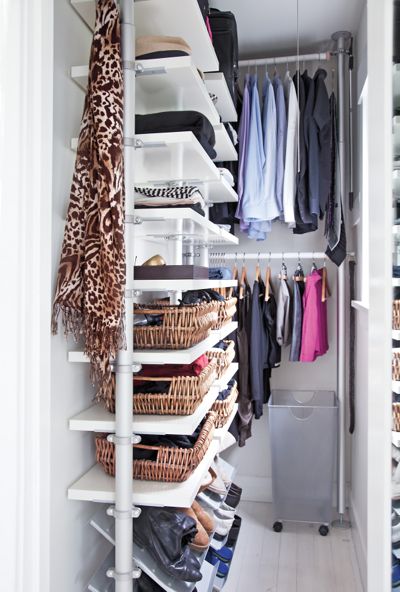
- Eschew fashion trends. Her trend-free wardrobe fits in a carry-on suitcase (!) and all pieces go with one another. Check out her closet:
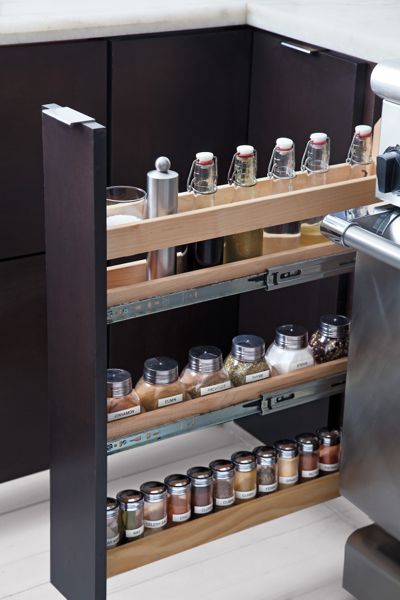
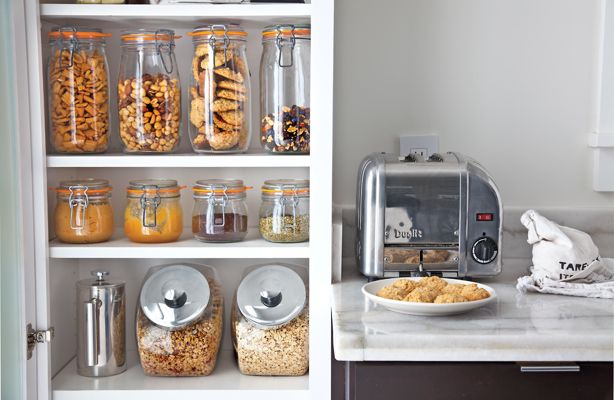
- Use your own reusable containers. According to the article, Bea brings her own containers when she shops, so she’s not bringing home disposable ones. She buys spices and pantry items in bulk and used her own glass containers to store them beautifully, as evidenced by these photos:
All I can say is wow. I look forward to checking out her book. That level of simplicity sounds a bit more spartan than enjoyable to me, but I admire the philosophy and effort behind it!
All photos by Laura Flippen, provided by and used with permission of Martha Stewart Living Magazine.
Spring snow!
The calendar says it’s spring, but the view out the window certainly doesn’t. St. Louis was hit with a record-making snow storm yesterday. The official amount, measured at the airport, was 12.4 inches. It measured at least that much in my neighborhood. The previous record for snowfall in one day was set exactly 101 years ago, on March 24, 1912, according to this article in the St. Louis Post-Dispatch. (A year ago today, it was 76 degrees.)
I’m trying to get work done today, despite the fact it feels like a snow day. I am so grateful that I didn’t have to drive anywhere today.
In any case, it’s very beautiful out there. Here are some photos for the sake of posterity.

The view of the snow from the second floor of our house.

Our (covered) back deck

Snowy covering on our neighbors' table.

Kirby's not exactly as white as the driven snow.
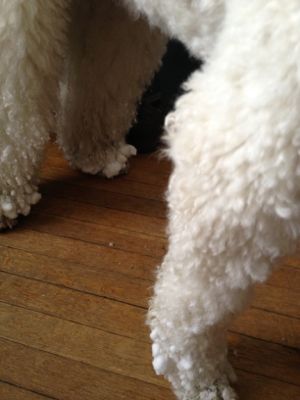
Kirby carried snowballs in on his legs.
Pretty as it is, I hope it melts soon!
Expo! Expo! Read all about it

This Saturday is the Get Organized St. Louis 2013 organizing expo presented by the St. Louis chapter of the National Association of Professional Organizers (NAPO-St. Louis).
It will be held at St. Charles Community College from 8 a.m. to 12:30 p.m. The current price for registration is $49. (It’s $59 at the door, so it’s best to pre-register.)
For less than fifty bucks you can hear from five speakers on the following topics:
- Home office and paper management, presented by Julie Hough and Carolyn Conboy
- Productivity and time management, presented by Denise Lee, CPO® and Jennifer Stewart (Denise’s talk will focus on productivity for those who have ADHD)
- Decluttering and organizing basements and garages, presented by me
In addition, we’ll have a Vendor’s Row, featuring our chapter’s associate members, companies that supply products and services that complement ours. You can come talk with representatives from these companies:
- At Your Service Personal Concierge Service
- Cintrex Audio Visual
- Closet Factory
- College Hunks Hauling Junk & Moving
- The File Room
- Garage Décor and More
- MoldBusters
- New Space
- Rubbish Works of St. Louis
And, finally, at the conclusion of the presentations, you’ll have the opportunity to ask questions of professional organizers (including me) in their areas of specialty.
It really is a unique opportunity to learn techniques and resources for organizing your space, along with getting your specific questions answered.
Again, register in advance for $49 at St. Louis Community College’s website. Seating is limited. If tickets are available at the door, they’ll be $59. I hope to see you there!!
My iPhone-versary
Okay, this anniversary might not seem noteworthy. But it’s very special to me. I’m still truly, madly, deeply in love with my iPhone 4S.
It’s been one year and four days since I bought my iPhone. How do I know? I marked it on my calendar, that’s how important it was to me.
My iPhone has been such a useful tool and boost to my productivity. It meshes really well with my philosophy of letting things be easy. My iPhone allows me to do things in a few seconds with a few touches that two years ago might have taken me minutes and several devices.

That's my cat, Joe, on my opening screen.
I pay about $148 each month for my iPhone service, which includes 900 minutes, unlimited texts and 5 gigs of data. I don’t use anywhere near 5 gigs of data typically, but that level allows me to use my phone as a wifi hotspot, which is invaluable. When I’m notified that that $148 has been charged to my credit card, I never, ever think, “That’s so expensive!” Though the amount is higher than I’ve ever paid for cell phone I’m happy to pay it.
Here are just a few ways my iPhone makes my life easier:
- I can set reminders, so that I don’t forget to do things I’ve promised to do.
- I have a wonderful, gentle alarm clock (I use the app SleepCycle).
- I save a lot of time by texting—I barely texted with my old phones.
- My calendar and contacts are always with me.
- I was able to get rid of my landline, saving me $80 a month, and I don’t even miss it.
- I can take pictures of things I need to remember, rather than writing them down (and my camera’s always with me).
- I don’t have to worry about WiFi being available (or insecure) when I’m out and about with my laptop.
- Thanks to Siri, I can send and receive text messages while driving without even looking at the phone.
And that’s just off the top of my head.
Am I tempted to trade in my beloved iPhone 4S for an iPhone 5? Not so much. (Though I do covet the 5’s sleekness when I handle it.) My 4S rocks just as much today as it did a year ago. When I’m eligible for an upgrade in another year I might go for it. But for now, I’m happy as a clam.
Happy anniversary, baby! I look forward to many more!
Simple fix = big results
I rearranged my office furniture last weekend, the most notable shift being moving my desk 90 degrees. I also moved a stand that holds a laser printer and Fujitsu ScanSnap scanner, so that the stand now backs up to my desk.
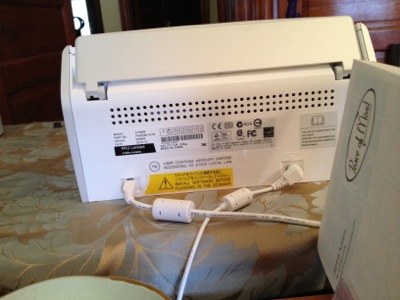
It’s great because it allows me to hide cords. But there was a negative side effect: When I sit at my desk, I now have a view of the back of the printer and the scanner. The problem with that is the scanner back is covered with electrical and warning labels. They’re not only ugly, but sort of urgent and stressful. That absolutely wasn’t going to fly. Check it out:
In a moment of inspiration—the type of inspiration that doesn’t usually come easy to me, so I’m particularly excited about it —I thought of just the thing to turn this situation around.
My friend, Sally Brown of Roll Over Rover Threads is an amazingly talented illustrator. Her pet-related designs decorate her fabulous t-shirt line. I help her every year at trade shows and am in love with these designs. So I simply went to her website and (with her permission) copied some of my favorite illustrations into a Pages document. (Pages is the Mac’s word-processing program.) They illustrations were in squares and four squares in a row was just the width I needed. I printed them out on my color ink-jet, cut out the strip and taped it to the back of the scanner, using double-sided tape. I used two removable Avery labels to cover the areas between the two cords.
Here’s the result.
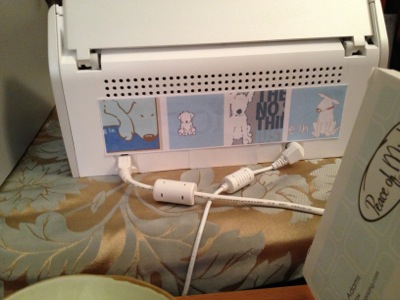
When I look up from my keyboard, I now see beautiful illustrations that make me happy and that are infused with the love and support of my dear friend, instead of ugly manufacturing labels.
It was such a simple fix. And it changed everything.
Take a look around your space. Are there any simple improvements you could make to make the space more beautiful and comfortable?
Shifting your perspective by shifting your furniture
I’m not somebody who switches furniture around. I know there are people who consider that fun, but I’m not one of them. I typically agonize over the placement of furniture and once it’s done, that’s that.
I’ve been in this home office (in what was a bedroom of our house) for 12 years. I rearranged the furniture in it in 2005, after a feng shui consult.
This year, I decided that another change was important. I’d heard a speaker say, “Change your space as you change” and that made an impact on me.
Trouble was, I didn’t have a clue as to how to change my space. (Space planning is not one of my strengths.) Then I read the description of the Workspace and Studio Redesign program from Jen Hofmann of Inspired Home Office. That really resonated with me and I signed up.
We had three terrific phone sessions. She helped me create a vision for my space and realize that what I was after was a clean space, clear of non-essential items. I decluttered my desk and then the rest of the office, to great effect. At our second session, she suggested I try the desk rotated 90 degrees, so that the left edge, rather than the front of the desk, was against the wall. She also suggested I rotate it another 90 degrees so my back was against the wall.
I got out the furniture movers, unplugged everything and gave it a try. I immediately liked the first iteration, the 90-degree rotation. I tried the 180-degree rotation, but it did not feel right at all.
So with the desk turned 90 degrees, so that I’m now facing the door and a set of bookshelves, I set about plugging everything back in. I realized that if I moved a fabric-covered computer desk upon which a laser printer and scanner rested so that its back was to the front of my desk, I could hide all my cables.
Oh my goodness! My quest for better cable management was complete! I can’t tell you how exciting it is that my cable mess is all but gone.
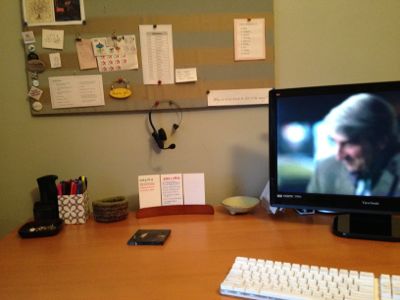
Here’s a before photo, taken after the initial declutter, of what my desk was like against the wall.
Here’s a photo I took today to give you a sense of the new placement of the desk.
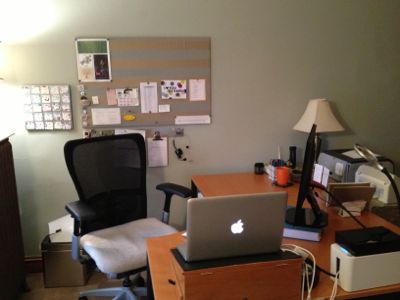
And here’s a photo taken from the door, to show how relatively cord-free the space now is.
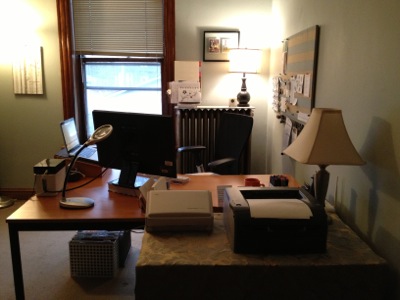
It’s been just over a week and I’ve found this shift quite interesting. I love having a fresh perspective on my office. Above my monitor I see the top two shelves of my bookshelves, so I moved to the top shelf the copies of the books I’ve written. It reminds me of my accomplishments and gives me confidence to glance up and see them.
To my left, on the wall, underneath the fabric-covered bulletin board that was already there, I mounted a magnetic strip so that I can post my daily task list and my weekly social media checklist. I also mounted my bingo board on the wall next to the bulletin board. I store the magnets for covering my bingo squares on the magnetic strip. And I hang my bluetooth headset from a hook on the magnetic strip.
Behind me, on the radiator in a desktop organizer, are the items I used to keep close at hand on my desk. I feel like my desk has become a cockpit, with everything right where I need it.
Since everything has a place, I’ve had absolutely no difficulty putting things away. My desk is effortlessly clear at the end of each workday and, pretty much, throughout the workday. It may just be the novelty of the situation, but I’m really enjoying how easy it is for me to keep this clean. There’s just no extraneous stuff.
Same goes for the floor of my office, which traditionally gets pretty easily cluttered. I now have less floor space to clutter up and it hasn’t even been a bit tempting to put something on the floor instead of putting it away.
I did have one little problem caused by turning the desk that I addressed in a stroke of brilliance (if I say so myself). I’ll describe in Wednesday’s blog post.
I’m still in awe of the difference this change has made. I love no longer facing the wall. I love the fact that everything is so neat and that I’d rid myself of the extraneous. I love that everything in the room represents who I am and where I’m going, rather than who I’ve been.
This is powerful stuff. If you’ve been tempted to switch things up in your office, I urge you to give it a try!
Search
Recent Posts
- Worth repeating: Figuring out what to watch on TV
- The power of incremental progress
- Podcast guest spot on the role of organization for folks with chronic illness
- No excuses series (part 3): "It was a present"
- No excuses series (part 2): "I paid a lot for that item"
- No excuses series (part 1): "But I might need it!"
- Retiring the New Organizer Guides
Tags
About Janine

Hello! I’m Janine Adams — a certified professional organizer based in St. Louis, and the creator of Peace of Mind Organizing®.
I love order, harmony + beauty, but I believe that the way that you feel about yourself and your home is what truly matters.
If you’re ready to declutter with a purpose and add more ease to your life, you’ve found the right blog — and you’ve found the right company.
read more »Links
- Organize Your Family History
- Ravelry
- Institute for Challenging Disorganization
- Are you interested in becoming a professional organizer?
- Shannon Wilkinson, life coach
- National Association of Productivity and Organizing Professionals
- Peace of Mind Spending
- Getting to Good Enough podcast
- NAPO St. Louis