First steps in getting started with family history research
As I’ve mentioned here before, I’ve been lucky enough to finally have the time to pursue one of my interests, family history research.
I’m jumping in with both feet and have started a blog, Organize Your Family History to share my journey and help other beginning genealogists have fun and keep from being overwhelmed (it’s so easy to feel overwhelmed!) as they do their research.
Last week, I had a guest blog post on Geralin Thomas’s Managing Modern Life® blog at MetropolitanOrganizing.com, called Five Tips to Organizing Your Genealogy Research, about the first steps to take in getting started. If you’ve thought about doing genealogy research but didn’t know where to start, click on the link you’ll see it’s quite simple. And you’ll also benefit from learning from the mistakes I made when I started this journey about ten years ago. (It stalled due to overwhelm and lack of time.)
I’m really enjoying the discoveries I’ve made. (Yesterday’s discovery: my great great great great grandfather was taken prisoner during the Battle of Shiloh in the Civil War.) I think this is a fascinating hobby.
As I posted before, I’ll be posting on my organizing blog on Mondays, Wednesdays and Fridays and on my family-history blog on Tuesdays and Thursdays. I hope you’ll join me there on occasion!
Turning temptations into rewards
It’s 4:46 pm and I’m just now writing today’s blog post. I meant to do it earlier in the day, but other things (like lunch with a friend and a haircut) took precedence. I also had promised to get answer reader questions for Rubbermaid by the end of the week and all of a sudden I was staring down that deadline.
The trouble is, I don’t really feel like writing a blog post after just finishing two longish articles for Rubbermaid. What I really feel like doing is watching the latest episode of The Glee Project. (Do you watch that? If you’re a fan of Glee and a fan of American Idol, like I am, it is the perfect combination of those two shows. I love it!)
I was tempted by The Glee Project. I’d queued it up on my screen. But I did not click Play. Instead, I told myself I could watch it AFTER I write a blog post.
And then, of course, I made it easy on myself by making the blog post about that decision. And by keeping it short.
The truth is that lots of people lament wasting time on the internet looking at things they enjoy that may not help them achieve their goals. I say that there’s nothing wrong with watching things you enjoy, if you try to make them a reward, rather than a temptation. If they help motivate you to do the items on your to-do list that further your goals, then they are actually contributing!
Now off to watch The Glee Project, guilt-free!
Saying yes can be a very good thing
About a month ago, I wrote a blog post about the value of saying no. In it, I talked about the freedom and relief I’m feeling now that a variety of volunteer professional commitments are behind me.
I stand by that post. But it doesn’t touch much on the fact that saying yes to those volunteer positions was really valuable for my career and standing in my industry. I’m awfully glad I did. (I’m just ready for a major break.)
Today, I read a post on Daily Worth (a money-related website for women) called Saying ‘Yes’ Pays Off. I found myself nodding my head when I read it.
I think the lesson here is to follow your gut when presented with an opportunity. If your heart says yes (even if your brain says no), go for it. Conversely, if your head says it’s a great opportunity, but it feels like a major drag or inconvenience, just say no.
Trying out a standing desk
We’ve all been reading recently about the health dangers of sitting all day. This is really bad news for people like computer programmers and writers who sit for hours at a stretch, in flow, while time zips by.
My clever friend, Margaret Lukens, of New Leaf and Company wrote a blog post about this entitled, Sitting is the new smoking .
When I work with clients, I’m usually on my feet. But I spend at least half (usually much less than half) of my work week with clients. The rest of the time, I’m at my desk, doing that desk work that’s so essential for running a business.
Not only that, but my hobbies are knitting and genealogy research, both of which are primarily sitting activities.
This news that sitting on my butt—something I do with somewhat alarming frequency—is dangerous is disturbing indeed. As I’ve read about it, I’ve become attracted to the notion of using a standing desk.
I saw this video about the working area of successful writer Christie Aschwanden who has a convertible standing/sitting desk. Unfortunately, it costs something like $3000, which is out of my price range (until I become convinced of the benefits).
I’ve seen multiple blog posts, starting here at Ikea Hackers and here at Apartment Therapy about creating a standing desk from a regular one.
I’m not the only one in my house thinking about it. One day I saw my husband standing at his desk, with his keyboard, monitor and mouse all resting on top of cardboard boxes. That didn’t turn out to be a sustainable solution.
I spent a little time thinking about how I might create a standing desk of my own. I know I don’t want to use one full time, because I’m on my feet plenty. But it would be nice to have one when I want to change things up during the day.
And then it hit me. I have two Expedit shelves on their sides, on legs, in one of my two home offices. I selected the legs so that the height would be right for working. Here’s a photo I took back when I was setting up this office.
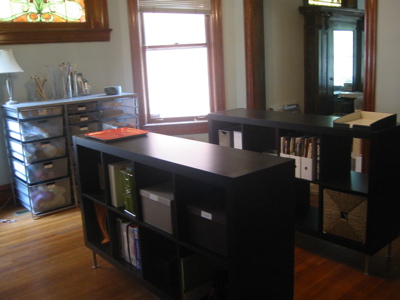
These cases hold supplies for clients
I also use a MacBook laptop, though it’s usually tethered to an external monitor (and I use a bluetooth keyboard and mouse when I’m at my desk).
Today, I decided to untether my computer from my desk and take it the few steps to the Expedit shelf. And here I am, writing this blog post while standing up.
I have to say, it’s kind of cool! The change of scenery is good. Standing feels good, since I’ve been sitting all day. I don’t think the ergonomics are the best, since I have to look down to see my laptop’s monitor. And I think my elbows are a little high. But it’s nice for short stretches. I think what I’ll do is set a reminder on desk days to work standing up for awhile.
If you’re intrigued by the notion of a standing desk, maybe take a look around your house and see if you already have something you can use. I’m glad I finally realized I did!
ETA: It’s now January 2017 and the popularity of standing desks has not waned (though I find I seldom stand at my computer). I’ve become aware of this great review of standing desks. If you’re interested in buying one, you might find it helpful.
And while I’m adding things, I’ll mention that my husband purchased a sit/stand desk a few years back. As I thought it might, it stays in the sitting position most of the time. But it’s awfully nice for him to have the option to raise his desk and stand.
Focus on what you've accomplished, not what's yet to be done
I did the first of what will be a number of team organizing jobs for a client recently. In that first session, my five-person team made some amazing progress. To me, it seemed like life-changing progress. I was thrilled.
At the end of the session, the client was happy, but didn’t seem over the moon. I chalked it up to her being tired after five hours of decision making.
Then I received a lovely note from her in which she explained that as happy as she was to get started in the process, at first all she could focus on was what was still left to be done.
That’s a common pitfall and just part of human nature. But, as a glass-half-full kind of gal, I so urge my clients (and you) to resist that temptation.
If you’re dealing with a large decluttering project, one way you can focus on what you’ve accomplished is to take before-and-after pictures. It can be a little emotionally difficult to take the before pictures if you’re living with severe clutter, that reminder of how things were can be helpful. Then take after pictures each step of the way and you’ll be able to see your progress.
You can create a private online album, so you have easy access to this valuable reminder of you what you’ve accomplished.
My client has decided to do this and, when the process is completed, to have a photo album printed of her journey. She’ll have every right to be proud. As she wrote to me,
After all, being clutter free will be one of the greatest accomplishments of my life.
A chilling (and cautionary) tale of hacking
Mat Honan, a tech writer who writes for Wired magazine, recently was the victim of hacking. As a result, his MacBook Air, iPhone and IPad were wiped of all data (and he lost a year’s worth of photos) and Twitter account was taken over.
Honan details the episode—including how and why the hackers attacked him—in a riveting article on Wired’s website.
There are a couple of things in the article that surprised me. One is that the hackers’ whole goal was to take over his Twitter account, apparently they wanted his three letter Twitter handle, @mat. The wiping out of his computer and devices was just in support of that. Honan actually communicated with one of the hackers and found out just how they obtained his passwords. (And he shares the details in his article.)
The other thing that surprised me was that this knowledgeable tech writer did not back up his hard drive, something that is very easy to do on his MacBook. And he really ended up regretting that, since irreplaceable photos he’d taken of his young daughter were obliterated.
If you’re not already backing up your computer, read this and I think you’ll start. (I use Time Machine + CrashPlan Pro.) Also, the article details some weaknesses in Apple’s security, especially coupled with Amazon and Gmail.
Fascinating, if scary, reading.
ETA: Here’s an article in which Mat Honan details how he recovered much of his data (including his photos), to the tune of $1690.
App of the Week: IMDB

I consider myself a bit of a movie/TV show savant. As bad as my short-term memory is getting as I age, I’m still hanging on to information about movies and shows and the actors who appear in them.
But even I need help sometimes. For more than a decade, I’ve relied on the Internet Movie Database or IMDB to give me the info I need on any movie or actor (or director, crew member, etc).
And now I have the database on my iPhone. The IMDB is a well designed portal to the massive entertainment database that powers IMDB. It’s easy to use. Attractive. And totally handy. I use it at least weekly, probably more often, when I’m trying to think of a name or title.
My only complaint with IMDB is that it makes my superpower of movie recall even less useful!
Search
Recent Posts
- Worth repeating: Figuring out what to watch on TV
- The power of incremental progress
- Podcast guest spot on the role of organization for folks with chronic illness
- No excuses series (part 3): "It was a present"
- No excuses series (part 2): "I paid a lot for that item"
- No excuses series (part 1): "But I might need it!"
- Retiring the New Organizer Guides
Tags
About Janine

Hello! I’m Janine Adams — a certified professional organizer based in St. Louis, and the creator of Peace of Mind Organizing®.
I love order, harmony + beauty, but I believe that the way that you feel about yourself and your home is what truly matters.
If you’re ready to declutter with a purpose and add more ease to your life, you’ve found the right blog — and you’ve found the right company.
read more »Links
- Organize Your Family History
- Are you interested in becoming a professional organizer?
- Peace of Mind Spending
- NAPO St. Louis
- Getting to Good Enough podcast
- Ravelry
- Shannon Wilkinson, life coach
- National Association of Productivity and Organizing Professionals
- Institute for Challenging Disorganization