Bingo anniversary!
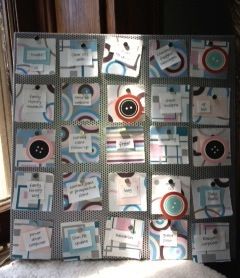
Here's how my bingo board looks today.
A year ago today, I first blogged about To-Do List Bingo. I created a bingo board after reading a blog post about social media bingo from my friend, Jacquelyn Kittredge of e-bakery.
I use my bingo board to help motivate me to do important, but not urgent, tasks on a daily basis. For me, that’s social media stuff, contacting past, prospective and current clients, pursuing guest post or speaking opportunities, doing family history research, and working on my new blog, Organize Your Family History.
Every time I do one of those things, I cover the space on the board. (I reshuffle the cards on the board every day.) At the end of the day, I take a look at the board and see what I need to do to get a bingo. And that’s usually motivation enough for me to do those tasks.
I love my bingo board for a bunch of reasons:
- It’s pretty
- It’s fun
- It’s flexible
- It gives me a sense of accomplishment for doing a bunch of small tasks
- It helps me get stuff done!
When I first started, I used Post-It® notes to cover up the spaces. That was visually unappealing and sort of fiddly (because sometimes they’d fall off), not to mention wasteful. A couple of months ago, I created decorative magnets by cutting out drawings of buttons from a calendar. Yesterday, I made a second set because I’ve been covering so many squares.
With the new magnets, the board has become even more satisfying for me. I just love it.
I’ve actually become sort of a proselytizer for To-Do List Bingo. I’ve blogged about it several times and I wrote an Organizing Guide about it, called TO-DO LIST BINGO! A game of completion + glee, for the whole family. In August of last year (after I’d been using it only a month!), I took my board on the road and did a segment on Great Day St. Louis, a local morning talk show.
These days, I’ve been getting triple and quadruple bingos on a regular basis and it makes me so happy. Sometimes people ask me what reward I get for getting a bingo and they seem surprised that the thrill of the bingo is reward enough for me. I guess I’m weird that way. (Certainly rewards could be attached to it, though.)
Just let it be easy
I have a little mantra I’ve mentioned here before.
I think it speaks for itself.
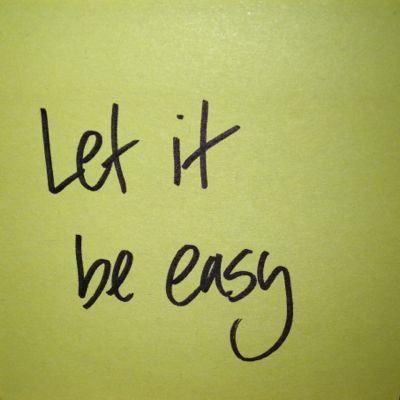
Next time you get twisted in knots over the details of a project or you’re grappling with some sort of conundrum, maybe you can keep it in mind.
I find it helps!
Two apps to help you get things done
I was perusing one of my favorite blogs, Unclutterer and saw my colleague Deb Lee’s recent post about two new-to-me productivity apps, Wonderful Day and iDone This.
Wonderful Day is a Don’t Break the Chain -style app that allows you to track your effort on daily goals and get the motivation that comes along with not breaking the chain.
iDone This is a twist to-do list apps. It’s actually a “done” list. You write down what you’ve accomplished each day, which I’m thinking will make you feel awesome and accomplished (and motivated to do more).
Deb’s write up of the two apps was enough to get me to download them and I’ll let you know what I think after I’ve tried them out. I’m particularly excited by the prospect of Wonderful Day.
Until then, I wanted to give you a heads up in case you want to give them a try!
Get a free sample of Simplify Your Life with Habits + Routines!

As I’ve discussed here before, I’m teaching an online workshop on the fabulous website, Simplify 101, called Simplify Your Life with Habits + Routines. In this three-lesson, four-week workshop, students will learn how to decide on what beneficial habits they’d like to develop, get support and accountability to develop them, and also how to link habits to routines. They’ll also learn how to kick habits that are less beneficial.
This is the third time I’ve offered the workshop and this time, there’s a special twist. Until Wednesday, July 25, you can sample the workshop free of charge. Just sign up here for the free sample (no credit card required) and you’ll receive the first lesson and have access to the wonderful online forum for the class (though you won’t be able to post). It’s a great way to get to know what the workshop is all about. Of course, I hope that once you’ve sampled it, you’ll want to sign up.
We have a great group of people already signed up for the class, but there’s room for more. So come check it out and take advantage of this wonderful opportunity!
I'm bringing you a DailyFeats Challenge!
In June, I wrote about DailyFeats an interactive website that helps you build daily habits. In a nutshell, you select habits you want to create, check in daily and receive points for doing what you say you’ll do. Points are redeemable for gift cards, charitable donations, and deals.
One aspect of DailyFeats that I didn’t mention in my blog post is the Challenges. You can sign up for a variety of Challenges, some of which are multi-feat and some single feat, and receive bonus points for fulfilling them. Challenges are typically brought to you by a person or company. A look at the Challenges page shows Challenges brought to you by Deepak Chopra, Ian Somerhalder, the World Wildlife Federation and me! Yep, that’s my photo right next to the photo of Ian Somerhalder (and a cute dog).
That’s because a month or two ago, the folks at DailyFeats approached me about doing a challenge with them. I was thrilled, since I’m all about habits and routines. I’m also all about staying on top of your mail (as evidenced by my e-course, Make Peace with Your Mail and my Organizing Guide, How to Fall in Love with the Mail Carrier All Over Again), so I suggested we do something that involved creating the habit of sorting the mail.

I explained how the habit of sorting the mail every day can have such an impact on people’s lives. So the DailyFeats team created a Sort Mail feat. And then we created a Just One Thing challenge to Sort the Mail each day for a week. It’ll be available only through August 5.
To check out this challenge, go to this landing page. When you join this challenge, you’ll commit to sorting your mail once a day for a week and, when you do, you’ll receive 100 bonus points, on top of the 3 points a day you get for doing the feat. Don’t stop at a week, though!
(I also did a guest blog post for DailyFeats with expanded information on why sorting the mail is so important.)
I’ve been using DailyFeats for a couple of months now and I find it’s fantastic for reinforcing habit creation. It’s fun to click on the feats and amass points. It’s also fun to redeem them! When I check in each day, I look over the feats I’ve added to my Feats I Do list and it reminds me of the healthy habits I’m trying to create.
DailyFeats does a great job of making habits fun. I urge you to give it a try. And what better way than through my Sort the Mail Challenge?. And here’s a little more good news: When you join via that link, you’ll get 100 points deposited into your account!
App of the week: Reunion

As I revealed earlier this week, I’m really getting into my genealogy research. Exploring my family history is loads of fun and, so far, I’ve been able to do most of it sitting at my computer.
I use the Reunion for MacIntosh software to enter data on my family tree. I’m only entering verified data and, as my family tree grows, I feel proud of my accomplishments and confident that what’s there is accurate.
I recently purchased the Reunion for iPhone app. (There’s a separate Reunion for iPad app.) I was prompted to buy it when I was at an exhibit about the Civil War at the Missouri History Museum. I knew that I had ancestors who lived in Missouri during that war, but I couldn’t remember where they lived. It made me wish I had that data at my fingertips (since it certainly doesn’t fit in my brain).
The app also comes in handy when, at the dinner table, I’m discussing interesting things I’ve learned about an ancestor and my husband asks me how this person is related to me. My iPhone is usually with me, so I can just look up the answer if I can’t remember.
The app will also be useful when I travel to visit my parents next month. I plan to pepper them (and my aunt) with questions about family lore and having the tree handy will be really helpful.
The app is nicely designed and complements the software well. Just touch a person’s name to get more information about them. Family trees can get quite large and overwhelming looking. One thing I love about this iPhone app is that it just presents one couple, their parents and their children on the screen. So I don’t have to pinch to enlarge the screen; everything’s perfectly legible.
It’s easy to synch the app to the file on the computer. But I sometimes forget to do the synch, since I’ve become so accustomed to my apps synching automatically through iCloud. I need to set a reminder to manually synch the Reunion desktop and app. (It’s wireless, it just requires a few keystrokes.)
If you use Reunion software and have an iPhone or an iPad, I’d say that it’s worth considering making the $15 investment in the app.
Rebooting the day
So it’s only 7:23 a.m. as I write this and I already feel like rebooting my day. Why? My cat, Joe, who’s been driving me nuts lately by lolling around on my desktop (frequently on top of my keyboard and mouse) rolled right into my full coffee cup, emptying it all over my desk. He spilled the coffee away from himself, so he didn’t even get up when it happened. I got him up.
I frantically found towels and paper towels to take care of the mess, fuming all the while and probably alarming my innocent standard poodle, Kirby, in the process.
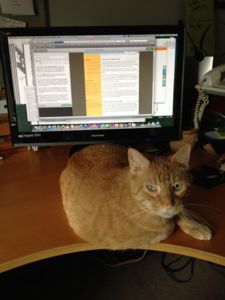
Joe, unapologetic desktop dominator
But now that I’ve cleaned up the mess, brewed and drunk another cup and calmed down, I’m trying not to let such an inauspicious beginning to the day ruin the whole thing.
There are some things to be grateful for in the situation:
- My desk wasn’t super cluttered
- None of the ruined paper products were important
- The coffee didn’t seem to affect the electronics it touched
- The coffee didn’t hit my Bingo board which I was in the process of setting up for the day when the mug was knocked over
- Joe wasn’t burned
- My desktop is now actually clean, rather than just tidy
- This might serve as incentive for me to do a better job of discouraging Joe from hanging around on my desk (wish me luck with that)
- I got a blog post out of the deal
When misfortunes occur, I tend to be something of a Pollyanna. I can usually see the good aspect of any situation, and for that I am so grateful.
Joe’s little indiscretion is a nice reminder that while I can’t control the actions of others, I can control my reaction to them. I was really, really annoyed when it happened and now I can shrug it off.
Here’s to a great day!
Search
Recent Posts
- Worth repeating: Figuring out what to watch on TV
- The power of incremental progress
- Podcast guest spot on the role of organization for folks with chronic illness
- No excuses series (part 3): "It was a present"
- No excuses series (part 2): "I paid a lot for that item"
- No excuses series (part 1): "But I might need it!"
- Retiring the New Organizer Guides
Tags
About Janine

Hello! I’m Janine Adams — a certified professional organizer based in St. Louis, and the creator of Peace of Mind Organizing®.
I love order, harmony + beauty, but I believe that the way that you feel about yourself and your home is what truly matters.
If you’re ready to declutter with a purpose and add more ease to your life, you’ve found the right blog — and you’ve found the right company.
read more »Links
- Getting to Good Enough podcast
- Peace of Mind Spending
- NAPO St. Louis
- Ravelry
- Are you interested in becoming a professional organizer?
- Shannon Wilkinson, life coach
- National Association of Productivity and Organizing Professionals
- Organize Your Family History
- Institute for Challenging Disorganization