Simple DIY solution
My dog, Kirby, loves chicken jerky treats. I’d been feeding him Beefeaters Chicken Jerky Treats each day as an after-dinner treat. But then the reports came out about potentially tainted chicken jerky treats imported from China. While Beefeaters wasn’t one of the brands that, according to news reports, the FDA has issued warnings about, they are made in China, so we stopped feeding them.
I don’t know who was unhappier about this turn of events, Kirby or the humans in the family. It just felt so mean to cut him off from something he enjoyed so much.
Today’s my husband Barry’s birthday and the animals in the family always give gifts on these occasions. They feel it’s best to give a gift you’d like to receive, so they frequently give animal treats. This year, I knew it would be a special surprise for Barry if Kirby gave him some safe-to-eat jerky treats.
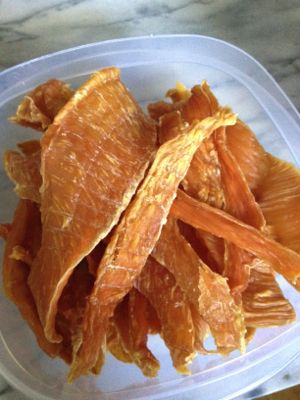
These made Kirby drool.
So I searched around the web, hoping to find some affordable chicken jerky treats made in the USA. Easier said than done. But then I found this article on making chicken jerky treats using a food dehydrator. It’s a great article, complete with photographs.
And then I knew what to do for Kirby’s birthday gift to Barry. Yesterday I bought a Nesco dehydrator at Bed, Bath and Beyond. I purchased some thin-sliced chicken breasts at the grocery store. And without Barry even noticing (it helps that we have two kitchens), I cut those chicken breasts into strips and put them on the dehydrator. I set it at the poultry setting (160 degrees) at 9 pm and when I got up at 6 am they were done.
I love it when there’s an easy DIY solution to what feels like a big problem. It’s another one of those instances where letting it be easy really pays off. Not only does Kirby get to keep enjoying a favorite treat, we’ll be able to make them easily and less expensively.
Barry was delighted with the gift. Kirby was even more delighted. Everybody wins!
Priorities
On page 23 of the March 2012 issue of Inc. magazine, a tweet from Maggie Fox, founder and CEO of Social Media Group is quoted. Here it is:
If you have any more than three priorities, you have no priorities.
I love that. The simplicity of that statement resonates so much for me. Since I read it a week or two ago, I’ve been trying to identify three priorities each day to focus on. I can see that this rings true for daily, weekly, monthly or annual priorities.
And may I just how cool I think it is for a tweet to lead to a full-page photo and quote in a national magazine? I love that those of us active on twitter can aspire to such a thing!
Get your Social Security statement online
I don’t know if you noticed, but if you’re under 60, the Social Security Administration has stopped sending you your annual statement that details what you will be earning in Social Security payments after retirement or disability. The statements are now available for online access, however.
I have to admit, this news thrills me. I see these statements littering the homes of clients who are afraid to dispose of them. I always advise folks to glance at the statement to make sure the earning record is accurate, then file it, throwing away any prior statements.
Now you don’t have to worry about whether or not to keep those things. Simply go to the Social Security Administration’s website, follow the instructions to create an account (security is very tight) and and you can view your benefits. If you’d like, you can generate a pdf of your statement (which will look just like the paper statement you used to get) and store it on your computer or, if you must, print it and file it.
My friend, financial planner Michele Clark of Clark Hourly Financial Planning clued me in to this development. She has a little more detail about the online statements in her blog post on the topic.
While you’re over there, check out Michele’s other savvy, accessible blog posts about planning your finances. It’s a wealth of information!
The case against balance
Everyone seems to hold up balance as an ideal. Like having a balanced life is something we should all want. Heck, even the cork in a bottle of Red Rock Winery wine I drank a couple of weeks ago espouses balance.
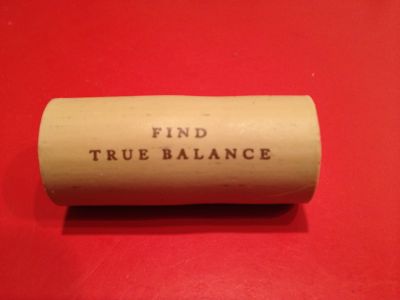
Stop telling me what to do.
But you know what? I think I’ve given up on striving for balance. I realize that a day where all my interests and activities are perfectly balanced is not only unrealistic but probably undesirable for me.
I like focusing on one thing for awhile. I like being into one hobby and not another. I don’t mind working hard and not socializing for awhile. It’s helpful that my husband and I both work from home, so we see plenty of one another, even when we’re working hard. And, since I don’t have kids, I don’t have to worry about fitting them in.
Rather than balance, I strive for ease and calm. I just don’t want to be stressed out.
My sprained ankle has imposed on me some down time the latter half of this week. And I gotta say, despite the pain (which isn’t that bad), it’s pretty wonderful. Is my life balanced this week? Heck no. I can barely walk, so I’m really not doing a whole lot except sitting at my computer or in front of the TV. But I can tell you what my life is this week. It’s calm and stress-free. And that’s just how I like it.
Is balance elusive for you? Is there something you’d rather strive for?
Don't give your mom clutter
Mother’s Day is just around the corner. Since moms tend to want to hang on to gifts their children give them, I urge you to consider giving her something that won’t become clutter.
Way back in 2007, in the very first edition of my monthly newsletter, I wrote about clutter-free gifts. I think the info bears repeating!
Clutter-Free Gift Giving
So many of my clients develop attachments to inanimate objects. Those attachments make it really hard for the client to part with the objects. And what happens? Clutter happens. I’ve found that clients who tend to get sentimental about stuff find it particularly difficult to part with gifts that have been given them.
This has certainly changed the way I think about gift giving. I personally believe that once I’ve given a gift, the recipient is free to do whatever he or she wants with it. My feelings won’t be hurt if the gift is given away or even thrown away. But I don’t want to clutter up anybody’s life. So I try to give gifts that won’t add to clutter. And I encourage you to think in the same way about gift giving, particularly if anyone on your gift list has a problem with clutter.
Here are some of my favorite ideas for clutter-free giving:
Fresh flowers. A beautiful arrangement of cut flowers livens up any room. After the flowers have died, they can be tossed guilt-free. I try to avoid including a vase with the gift—I’ve seen many a home cluttered by florists’ vases! An easy website for ordering flowers is 1-800-flowers. I’ve also used Proflowers with success. Sometimes I’ll call a local florist in the recipient’s town, if I know of a good one.
Pampering. If you have a friend who would enjoy a little pampering, consider a gift certificate for spa services. Many cities and even towns have day spas. A massage or facial (even for men!) might be something your gift recipient wouldn’t do for him or herself. To find a spa in your gift recipient’s community, try Spafinder.
Services. Give someone the gift of time by offering to perform some needed services for him or her. You could offer a few hours of babysitting, offer to shovel snow, rake leaves, walk dogs or even clean house. If you’re a gardener, offer to do some landscaping. If you’re good with computers, offer to set up a wireless network or make their computer more secure. These gifts are clutter-free and really very special. You can also give a gift certificate for organizing services if you’re sure that the recipient would love to work with a professional organizer.
Clutter-free subscriptions. Giving a magazine subscription is a nice year-long gift, but many people let magazines pile up. Instead, consider giving a subscription to a services like Netflix or Blockbuster Total Access, which send rental DVDs right to your recipient’s home. If your gift recipient likes to listen to the spoken word, a subscription to Audible might be just right.
Edibles. Give something perishable to eat and you know it won’t linger in your gift recipient’s home. You can make homemade goodies, or send a gift package from a place like Wolferman’s, which sells English muffins and specialty breads, or Harry & David for fruit or other editbles. In 2006 Food and Wine published a terrific article on giving edible gifts.
A side benefit to giving an intangible gift is that you don’t have to go out shopping! Let your fingers do the shopping online. And give yourself (and your gift recipient) the peace of mind of not adding clutter to a cluttered world.
Going with the flow
Today was the one day this week I had to work at my desk. Desk days are really important for me as a small-business owner. I have to spend a certain amount of time at my desk, taking care of business, working on volunteer tasks and so forth.
While I was walking my dog this morning, I was going through my to-do list in my head, planning what I was going to get accomplished today. I was absorbed in thought and somehow walked on the edge of the sidewalk, where it meets the grass of the parking strip (or tree lawn or whatever they call it where you live). Down i went, rolling my ankle while I was at it. Ouch! Luckily, I was a half block from the home of my friend, John, so I limped there and he put ice on it, then drove Kirby and me home.
The swelling was pretty swift and enormous, so it seemed like an x-ray was in order. Thankfully, it’s sprained, not broken.
No great big deal, but man, it’s thrown a wrench in the works! First off, that list of things that was going to get done today? Only the essentials were actually accomplished.
Next, crutches for the next few days? It’s times like this that I wish I had a phone coaching practice. I go into people’s homes to help them organize and crutches really don’t fit into that picture. So I had to reschedule my appointments for the next three days.
Here’s the silver lining: I get to spend more time at my desk this week. I should be able to get a lot done! Logistics aren’t the greatest, since my office is on the first floor of our house and the kitchen is on the second floor, and I’m on crutches. But it’s all good.
Experiences like this are great lessons in taking what comes and not trying to control everything. And there’s much to be thankful for. I’m grateful that my ankle wasn’t broken, that I have health insurance, that my husband took me to the ER, and that my friend who’s an ER doctor greased the wheels at the hospital for me.
The lesson here: Just go with the flow. I look forward to seeing what the rest of the week brings.
Making things easy
I often write about my mantra, Let it be easy. When I get all wound up about something, I’ll take a deep breath and repeat my mantra and things usually get better. Like many people, I have a tendency to make things more complex than necessary and my “Let it be easy” focus has been really helpful.
That’s wonderful. And it’s also pretty passive.
Sometimes you have to make things be easy. That is, sometimes it’s great to take action to change things that are difficult or annoying.
Case in point: my aging eyes have made computer use more difficult. I have progressive-lens glasses, but they don’t work well at the distance my computer monitor is from my face. So when I use my computer, it’s best if I take my glasses off.
But I’ve noticed that with my glasses off, the screen is blurrier than I’d like. I got new glasses in February and insurance won’t cover a new pair until next February. (Then I’ll talk to the doctor about changing the prescription to address this issue.)
Recently, rather than squint, strain my eyes or just tolerate annoyance, I took action. I bought a larger monitor so that the writing on my screen would be bigger.
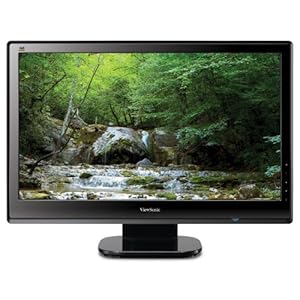
The hardest part was deciding which one. (I blogged about how hard it can be to decide on things when there are too many choices recently.) As I tried to weigh all the options, I whispered to myself, “Let it be easy.” And I chose one that seemed good, with good user reviews, even though I didn’t know that it was absolutely the best one.
A couple of clicks later all that was left was to wait for the monitor to arrive from Amazon. It arrived the next day (thank you, Amazon Prime!) and it took me all of 15 minutes to set up. Now I can easily see the text on the monitor. Ahhhh.
Are there things in your life that are difficult or annoying that a small action could remedy? Why not make things a little easier for yourself?
Search
Recent Posts
- Worth repeating: Figuring out what to watch on TV
- The power of incremental progress
- Podcast guest spot on the role of organization for folks with chronic illness
- No excuses series (part 3): "It was a present"
- No excuses series (part 2): "I paid a lot for that item"
- No excuses series (part 1): "But I might need it!"
- Retiring the New Organizer Guides
Tags
About Janine

Hello! I’m Janine Adams — a certified professional organizer based in St. Louis, and the creator of Peace of Mind Organizing®.
I love order, harmony + beauty, but I believe that the way that you feel about yourself and your home is what truly matters.
If you’re ready to declutter with a purpose and add more ease to your life, you’ve found the right blog — and you’ve found the right company.
read more »Links
- Institute for Challenging Disorganization
- Are you interested in becoming a professional organizer?
- NAPO St. Louis
- Shannon Wilkinson, life coach
- Ravelry
- National Association of Productivity and Organizing Professionals
- Peace of Mind Spending
- Getting to Good Enough podcast
- Organize Your Family History