Got a clutter emergency?
It can be overwhelming when you know guests are coming and your home doesn’t feel quite up to snuff. (My brother’s visit has me scurrying around taking care of small decluttering projects.)
I feel really fortunate to have the tools available to me to declutter and organize my home when I’ve let things get out of hand. But I know from my clients that it’s really easy to look around a room and have no idea where to begin. And I also see the stress brought on by just shoving stuff in bags and boxes and stashing them away. (I can’t tell you how many of those bags and boxes I’ve helped clients go through, sometimes years later.)

Here’s somethings that can help. It’s Quick Clutter Fix, a seven-step process that helps you get your home ready for guests without creating more stuff to deal with down the road. It comes in the form of a 8.5-minute audio and pdf outline that I created with my Declutter Happy Hour partner, Shannon Wilkinson. It tells you how to whip your house into shape in short sessions, giving you a clear idea of exactly where to start and what to do.
And here’s the best part: Quick Clutter Fix is free! Just sign up and you’ll receive a download link. Soon you’ll be able to shed that overwhelmed feeling and happily welcome your guests.
Worth repeating: What is Organized?
This week marks the 7th anniversary of my blog. I posted my very first post on November 10, 2006. Since then, I’ve posted 906 more. I thought it would be fun to re-post that first post. I’m happy to note that the first post isn’t an embarrassment and that I would write the same thing (perhaps phrased differently) today. Enjoy!
How many times have you heard people say, “I need to get organized”? But what do they mean by that? How do they measure, “organized?” As a professional organizer, I think about this a lot. To me, organized means being able to put my hands on what I need when I need it. As long as I know where things are and can find them easily (and that includes finding appointments in my calendar), I feel organized and in control. Even if something’s in a stack, as long as I can grab it swiftly, that’s organized. So for me, organized doesn’t mean that everything is put away and that all surfaces are clear. And in fact, neat spaces aren’t necessarily organized.
You might not agree. I’ve had clients who feel out of control if they have a stack or two on their desk they can’t seem to get rid of. That’s okay—I’m happy to help them figure out how to get rid of those stacks.
I’ve come to the conclusion that “organized” is a state of mind. It’s great to feel organized. I think people who feel organized are happier, with less stress and higher self esteem. Is there such a thing as too organized? No, as long as the level of organization of the individual feels right to them. I’m pretty casual, so sometimes I feel uncomfortable around or overly controlled by a Type A super-organized person. But as long as they’re happy (and they’re not making the people they live with crazy), that’s okay.
The bottom line is that “being organized” is an individual thing. I shouldn’t impose my standards of organization on anyone (which can be a challenge in my line of work). Likewise, you shouldn’t judge me because an occasional stack of paper languishes on my desk and it doesn’t bother me. Perfectionism can be the enemy of the organized person. I encourage my clients to be “organized enough.” If it’s desirable and achievable for you to have a house that would make Martha Stewart proud, go for it. But if not, don’t beat yourself up. Strive to find the level of organization that makes you feel comfortable and in control, then work to maintain it.
What’s your definition of organized?
The value of house guests
My brother, Larry, is coming to visit later this month. It’ll be the first time he’s ever visited me. He lives in Australia, and his visits to the U.S. are fairly few and far between and usually restricted to Washington state, where we grew up and where our parents live. (When he visits Walla Walla, I go there too.) But this year I persuaded him to come to St. Louis before going to visit our parents.
I visited him in Australia in 2009. It was wonderful to see Larry and his family in their natural habitat and I look forward to his seeing me in mine.

My brother and me on the Sunshine Coast in Australia in 2009
I’m excited to have him come. I’m looking forward to hanging out with him and showing off my 100-year-old home. But that’s caused me to look at my house with new eyes.
It’s been 12 years since we moved back here from New York and despite the fact we have plenty of room, and that I’m a professional organizer, lots of little pockets of disorder have cropped up over the years.
As I look around, knowing that we’ll be having a guest who’s staying longer than any guest ever has, I see loads of little projects. Here’s the list:
- Put everything away after the bathroom is through being painted (by a pro)
- Declutter and organize the guest room closet
- Declutter the guest room bookshelf (there are lots of cat toys there and our cat passed away earlier this year)
- Declutter and organize the extra closet
- Organize winter accessories (need to do that anyway)
- Declutter the front hall closet
- Organize CDs
- Declutter the downstairs kitchen (we have two kitchens and the downstairs is used primarily for storage)
- Take old electronics in for recycling (or arrange a pick up)
The nice thing is that the projects are small, for the most part. I have 10 days until Larry gets here, so I need to do about one project a day.
The other nice thing is that we’ve done a lot of little projects throughout the year (like organizing the bathroom closet, the dresser, the keys and the junk drawer), so this doesn’t feel like a big crunch.
Having house guests can be so valuable for looking at your house through new eyes. (Heck, having dinner guests sometimes accomplishes that!) It be nice to have my brother around (and another guest, a mutual friend of Larry’s and ours, who is visiting for part of Larry’s visit). And it will be really nice to have accomplished these projects.
Thanks, Larry!
Worth repeating: Simple DIY solution
I wrote the blog post below on May 9, 2012. That’s when we started making jerky treats for our dog, Kirby, after I learned that dogs were getting sick from eating jerky treats imported from China. Eighteen months later, the problem persists. According to an article in yesterday’s New York Times as of last month there have been 3,600 reports of illnesses related to the treats, and 580 deaths, almost all of them dogs.
Personally, I can’t believe these items are still on the shelves. I figure the more pet owners who know about the problem, the more animals saved. If you have a pet who loves jerky treats, make your own. Trust me, it’s easy. If you’re a dog owner who feeds jerky treats, please check out this blog post and click on the links for instructions.
My dog, Kirby, loves chicken jerky treats. I’d been feeding him Beefeaters Chicken Jerky Treats each day as an after-dinner treat. But then the reports came out about potentially tainted chicken jerky treats imported from China. While Beefeaters wasn’t one of the brands that, according to news reports, the FDA has issued warnings about, they are made in China, so we stopped feeding them.
I don’t know who was unhappier about this turn of events, Kirby or the humans in the family. It just felt so mean to cut him off from something he enjoyed so much.
Today’s my husband Barry’s birthday and the animals in the family always give gifts on these occasions. They feel it’s best to give a gift you’d like to receive, so they frequently give animal treats. This year, I knew it would be a special surprise for Barry if Kirby gave him some safe-to-eat jerky treats.

These made Kirby drool.
So I searched around the web, hoping to find some affordable chicken jerky treats made in the USA. Easier said than done. But then I found this article on making chicken jerky treats using a food dehydrator. It’s a great article, complete with photographs.
And then I knew what to do for Kirby’s birthday gift to Barry. Yesterday I bought a Nesco dehydrator at Bed, Bath and Beyond. I purchased some thin-sliced chicken breasts at the grocery store. And without Barry even noticing (it helps that we have two kitchens), I cut those chicken breasts into strips and put them on the dehydrator. I set it at the poultry setting (160 degrees) at 9 pm and when I got up at 6 am they were done.
I love it when there’s an easy DIY solution to what feels like a big problem. It’s another one of those instances where letting it be easy really pays off. Not only does Kirby get to keep enjoying a favorite treat, we’ll be able to make them easily and less expensively.
Barry was delighted with the gift. Kirby was even more delighted. Everybody wins!
Accepting help
Sometimes I wonder why it is so hard for most of us to accept help. By the time I’m called into a client’s home, she (or, sometimes, he) typically has contemplated hiring me for weeks, months, or years. And typically that time is filled with guilt, self-recrimination and stress.
The reluctance to accept help isn’t limited to hiring someone, though. I’ve observed that it can be difficult to ask for help from friends or family members or even accept help when it’s offered.
Accepting help is a big part of how I try to let my life be easy. There are many things I’m not good at that my friends are. For example, my friend, Sally picks out all my wall paint colors. I’m absolutely inept at that. I’m a bit color-challenged, I’m easily overwhelmed by too many choices and I lack confidence in my design abilities. Sally is great at it and loves doing it. Hooray!
My friend Geralin helps me with sticky wardrobe choices. If I’m going on TV, I call Geralin for advice on what to wear and how to accessorize. If I want to knit myself something, I’ll check with her to make sure she thinks the sweater would be flattering on me. (One time she replied with a succinct “Not on my watch!”) Geralin is great at this and it seems as natural to her as breathing. Why wouldn’t I ask her help?
I have a wonderful housecleaner who comes every week. He does a much better job than I ever would and he relieves me of a dreaded task. Same goes with the guy who mows our lawn.
I no longer have a problem accepting help, whether hired or gifted. I know I love helping people, so I believe my friends when they say they want to help me. I have no trouble charging my clients for my help, so I have no difficulty paying others for theirs.
Is there anything in your life you’d benefit from getting help on? Ask for it!
The Active Every Day challenge
My friend, Shannon Wilkinson, of Perception Studios has launched her Active Every Day in November challenge.
Her goal? To get us up and moving. Being active is so important. As another friend Margaret Lukens, says, Sitting is the new smoking. So if you take on Shannon’s challenge, every day in November you’ll purposely be a little more active than you ordinarily would.
For me, that might mean:
- Using the stairs instead of the elevator
- Taking my dog for longer walks
- Staying on the cardio machines for an extra five minutes (or longer)
- Exercising more than three days a week at the gym (that would be huge)
- Parking farther from the entrance to a store or office building
- Dusting off my Wii Fit and doing some dancing or exercise games
You get the idea. Whatever your activity level, take it up a notch and get a little more active than usual. Every day.
If you choose to participate in the challenge, you can post your activity on Twitter with the hashtag #ActiveEveryDay. Or post to or tag the Perception Studios Facebook page. Be sure and read about the challenge on Shannon’s blog post for rules and her ideas of activities and ways to share.
I’m looking forward to purposeful activity this month!
The virtues of a nice lined notebook
I have a fondness for a nice notebook, particularly one with lined paper. I’m somewhat particular, but luckily there are a lot of notebooks that meet my exactly standards. Way back in 2008, I blogged about some notebooks I’d been enjoying.
When I want to put together a planner-type notebook, I go for respositionable-page, ring-bound notebooks, like Levenger’s Circa notebooks or the Arc Notebook from Staples. (I blogged about the Arc Notebook in July of 2012.)
Lately, I’ve been more interested in making task lists in my notebooks than using them to organize projects. I use lined notebooks to capture my thoughts on various topics. I like having one go-to notebook so that I can peruse the results of previous brainstorming sessions.
In December 2011, I discovered the At-A-Glance Planning Notebook with Circle the Date. (I wish I could provide a link, but they’re no longer selling it!) Here’s a photo of a blank page.
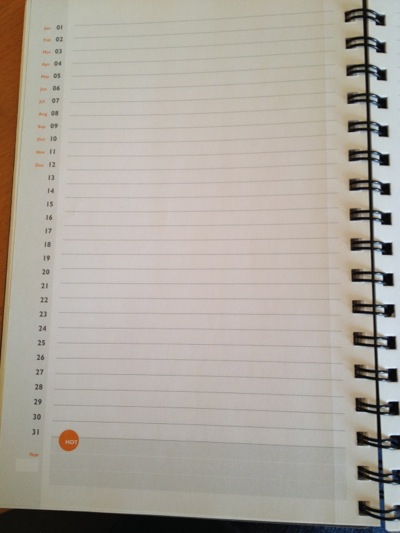
Listed vertically on the outside margins are the months and numbers 1 to 31. You circle the date and fill in the year, which for some reason really appeals to me. I think it’s because it’s a visual reminder to date my notes, which are so important when I’m looking back at them.
I love the feel of the paper and the subtlety and spacing of the lines. Love love love. I also love the orange and grey color scheme. Just today I came to the “Time to Reorder” page, so before long I’m going to have to switch notebooks. As I mentioned, they’re no longer selling this particular model, but the good folks at At-A-Glance were kind enough to send me some products to test out. Among the products was their Planning Notebook with Reference Calendars notebook, which is quite similar. Same subtle lines but no circle the date. And it has a 12-month calendar at the bottom of each pair of pages, which is really handy in a meeting.
These would be great notebooks for task lists. But that’s not how I use them. Here are the kinds of things I capture in my planning notebook:
- Potential blog post ideas
- My Be-Do-Have exercises (see Margaret Lukens’ Be-Do-Have wee book to see what I’m talking about…this is a really useful planning exercise)
- Ideas on any shifts I’m considering to my business model
- Notes when I’m reading a book
- Notes when I’m taking a class
- Reflections I capture when I’m on vacation
For me, having one place to write down these kinds of thoughts is so important. If I were to have different notebooks for different types of topics, I’d inevitably not have the right one with me (or I’d grab the wrong one). All the entries are arranged chronologically, since I just go to the next available page when I’m about to start a new note or list. Convenient, easy and, for me, really effective.
P.S. At-A-Glance provided me with a free shipping coupon code to share. If you order at least $50 in products from their website use the code GRFSXX3 to receive free shipping. It expires 12/31/13.
Search
Recent Posts
- Worth repeating: Figuring out what to watch on TV
- The power of incremental progress
- Podcast guest spot on the role of organization for folks with chronic illness
- No excuses series (part 3): "It was a present"
- No excuses series (part 2): "I paid a lot for that item"
- No excuses series (part 1): "But I might need it!"
- Retiring the New Organizer Guides
Tags
About Janine

Hello! I’m Janine Adams — a certified professional organizer based in St. Louis, and the creator of Peace of Mind Organizing®.
I love order, harmony + beauty, but I believe that the way that you feel about yourself and your home is what truly matters.
If you’re ready to declutter with a purpose and add more ease to your life, you’ve found the right blog — and you’ve found the right company.
read more »Links
- Are you interested in becoming a professional organizer?
- NAPO St. Louis
- Ravelry
- Peace of Mind Spending
- National Association of Productivity and Organizing Professionals
- Getting to Good Enough podcast
- Organize Your Family History
- Shannon Wilkinson, life coach
- Institute for Challenging Disorganization