Have you upgraded to iOS 7 yet?
If you have an iPhone or an iPad and haven’t yet upgraded to the newest operating system, iOS 7, I’m going to give you one good reason to do it.
This is it:

It’s called Control Center and it’s the screen you get when you swipe up from the bottom of any screen, even when your phone is locked. From this screen, with one touch you can:
- Turn on the flashlight
- Access the clock app (which includes alarm, timer, stopwatch and world clock)
- Pull up the calculator
- Take a picture
That’s right. They’ve made the four things I use most often available instantly with one swipe. To me, that’s worth any inconvenience I might have experienced getting used to the new operating system. (Though, actually, I loved iOS 7 from the start.)
From the Control Center screen with one touch you can also:
- Control your music
- Adjust the brightness of the screen
- Put the phone in Airplane Mode
- Turn on or off WiFi
- Turn on or off Bluetooth
- Put the phone on Do Not Disturb
- Lock your screen’s orientation
I know some folks can’t upgrade because of space considerations. But if you’ve been dragging your feet just because you’re averse to change, it might be time to reconsider. Come on in, the water’s fine.
Worth repeating: Being happy with less than perfect
I wrote this blog post two years ago after hearing Harold Taylor speak about perfectionism. I loved his take on it and was happy when I re-read this post yesterday. In case you didn’t catch it the first time around, this is definitely one worth repeating.
A week ago, I attended a time-management seminar offered by Harold Taylor. It was terrific. I’ve been inspired by Harold Taylor’s words of wisdom for going on 20 years now and he didn’t disappoint.
Much of the material was familiar to me, but he still offered some great stuff to chew on. One was a new take (for me) on perfectionism. I’ve long known how paralyzing perfectionism can be. I’ve seen the detrimental effects on my clients of feeling like everything has to be done perfectly.
But Harold had me thinking about it in a slightly different way. For example, he defined a perfectionist this way:
A perfectionist is someone who spends a greater amount of time on a task than it merits.
What a wonderfully simple definition and one that is really useful in my life.
Harold said that the amount of time you spend on something should be in proportion to its value. So no need to get nitpicky on a single email to a single person. However, if you’re writing an article to be read by thousands, that deserves a little more of your time.
He also mentioned the law of diminishing returns: The nearer you come to perfection on a task, the more time it takes. In other words, you don’t get a fair return for the extra time trying to make something that’s already good even better.
What I took away from this is that doing something well, but not perfectly well, is very smart. If I’m tempted to not send something I’ve written because I haven’t gone over it yet again with a fine-toothed comb, I can ask myself, as Harold suggests, “What’s the impact if this is the best I do with this?”
Harold suggests that if your value is tied up in what you do, rather than who you are, you’re more likely to get caught up in this perfectionist trap. That’s excellent food for thought.
I think this “good enough” mentality can really free up some time. I’m planning to experiment by embracing it whole heartedly in my work in the coming month and try to note whether (a) I actually do save time and (b) whether there are any negative consequences to it.
This is going to be my mantra in October, courtesy of Harold Taylor:
Just because we can do better doesn’t mean we have to.
Preventing late fees
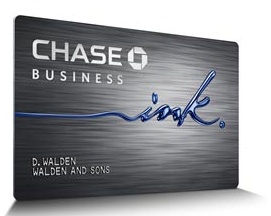
This month, I forgot to pay my credit card on the 17th. I don’t know what happened. I never forget. But on Saturday, I realized that the bill was due two days before and I’d forgotten.
Luckily, I had a back-up plan. About 18 months ago, at the advice of my friend, Shannon Wilkinson, I had arranged an automatic payment of the minimum amount due on the 17th, for instances just like this. I like to pay my credit card in full every month and up until now had done that before the automatic payment would kick in. But, since I forgot this month, at least the minimum payment was made and I avoided a late-payment fee.
I doubt I avoided an interest charge, to my dismay. I haven’t paid an interest charge in a couple of years, since I paid off my cards back in 2011. But a couple of days’ interest on a not-huge balance isn’t a big deal.
I could change my automatic payment so that the whole balance is paid, but I worry that that could spark a cash-flow problem. So, for me, this backup measure is a good one.
Late payment fees can add up and are definitely worth avoiding. If they’re problem for you, perhaps you could arrange for the minimum to be paid like I do. This month, I was sure glad I did!
(I do get an email reminder about the payment, but I think I’ll adjust it so that it comes closer to the due date and I don’t blow it off.)
Do you have any other tips for automating payments, not forgetting due dates, or otherwise avoiding late-payment penalties?
More wisdom from Mark Forster
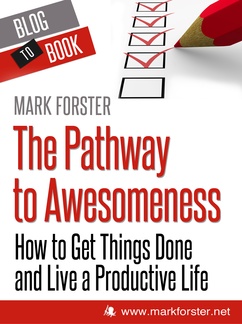
Over the years, I’ve written 47(!) blog posts that mention Mark Forster, my favorite time-management guy. Mark really enjoys thinking about things like time management and productivity. I’ve been a fan ever since I read his book Do It Tomorrow and Other Secrets of Time Management seven years ago.
So of course I had to post here when I learned that today Mark released a new e-book, called The Pathway to Awesomeness: How to Get Things Done and Live a Productive Life. The book is comprised of blog posts he’s written over the last decade or so. I immediately bought it and have just started reading it. I’ve probably read four entries, and that’s enough for me to recommend it to you.
Each entry is short and digestible. Mark’s a prolific blogger and he’s plucked some real treasures out of his blog for this book.
The book’s divided into 14 sections, including:
- The Beauty of Simplicity
- Set the Right Kind of Goals
- Be Flexible, Not Enslaved!
- Manage Your Time to Stay Productive
- Avoid the Plague of Procrastination
If you’re in the mood to ponder such topics, then you’re in for a treat. And it will only cost you $6!
The book is available from Amazon US, Amazon UK and the publisher, Hyperink. On Hyperink, you can buy it in Kindle, iPad, Nook and PDF formats. (Be forewarned that transferring a book to your Kindle from Hyperink is more complicated than Amazon’s One-Click.)
The thing that amazes me about Mark Forster is intense curiosity in exploring subjects like these. I look forward to giving the book a good read.
Portable power station
I don’t usually have too tough a time with my iPhone 4S running out of juice. I charge it nightly when I sleep and the charge typically lasts the day.
But when I’m using my phone as a WiFi Hot Spot or for some other battery-draining purpose, sometimes I run into trouble. And I’m not always in the car or at home when my phone comes dangerously close to turning itself off.
I was delighted, therefore, to see this myCharge Trek 2000 portable power station? at Office Max for just $10. It’s doesn’t work for phones newer than the 4S, which is why I suspect it’s so heavily discounted. (The regular price is $60.)

This little device is easily stowed in my purse. I charge it with its USB cord and when I need to charge my phone, it turns into a little docking station. I keep it in my purse (I charge it after I’ve used it) and I no longer have to worry about carrying a charger or being near an electrical outlet.
When I traveled last month, it was particularly handy, since outlets were few and far between at my departing airport.
If you have an iPhone 4S or earlier, you may want to check it out!
The joy of a clean computer destop
Last July, I cleared off my very cluttered computer desktop. As I wrote then, it took only 50 minutes and I did it while flying on an airplane.
It’s been three months, and I just have to share how wonderful it’s been to have a clear desktop! It’s not that I look at my computer’s desktop much—I’m one of these people with multiple computer programs open all the time.
But what’s handy is that the desktop is now a place I can park things temporarily, like photographs I want to upload to one of my blogs. Anything I save there hangs out at the right margin of my screen. When I need to select a file in a Finder window, I click on Desktop and there are just a few there, typically.
I had no idea this would be such a time saver. And it’s so easy to maintain. When I notice files there, I just move them to the appropriate folder or to the trash. It’s really become a very useful temporary holding place for me.
And it makes me feel good when my computer boots up!
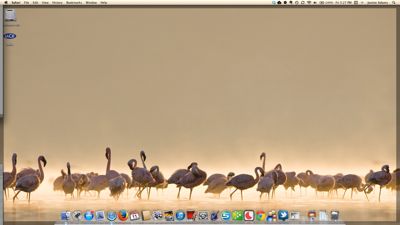
Here’s how my desktop looks today. (It’s an image that came with the computer, one of a few that rotate through.)
Accessorizing my new car
I bought a 2008 Honda CR-V about a month ago. It replaces an older Honda Civic. I realized I need more room to carry around the supplies I use on my team jobs. (Incidentally, I bought it on Craiglist, and it was an excellent experience.)
I love my new car—it’s a top-of-the-line EX-L so it has a posh feel about it. I’m most excited about the heated seats. I immediately started thinking about how I would organize it (I’m still tweaking that), which took me to Pinterest, of course.
I started a car-organizing Pinterest board and then suppressed my impulse to head straight out and buy organizing solutions. I realized I really needed to give it some time to figure out what my organizational challenges are with regard to my car before buying anything.
But there was one thing I knew I needed: A wastebasket. (The passenger front seat filled that role all too often in the Civic.) And I had the perfect solution right inside my house. Here it is, in the car:
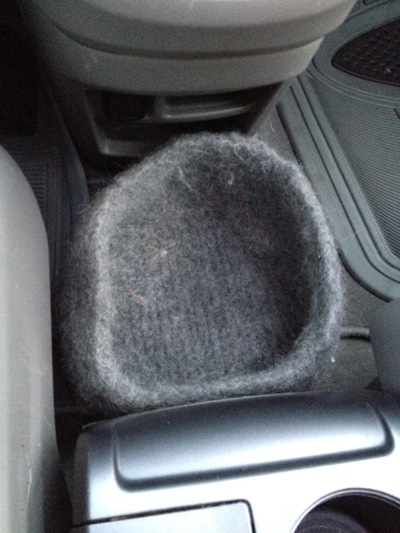
It’s a felted basket I knitted a bazillion years ago. I knit it for the fun of it, without a real need for the finished object. My cat, Joe, liked sleeping on it, so it was usually squashed and covered in cat hair.
Now it has a place of honor in my car, between the center console in the dash. It fits the space perfectly and even blends in color-wise. Its wide-open top makes it easy for me to toss in a protein-bar wrapper when necessary and also makes it easy for me to see when it needs to be emptied.
I have to say: this makes me happy. Eventually, I’ll be purchasing some supplies for organizing the cargo area of my little SUV. And when I do I’ll post about it here.
Search
Recent Posts
- Worth repeating: Figuring out what to watch on TV
- The power of incremental progress
- Podcast guest spot on the role of organization for folks with chronic illness
- No excuses series (part 3): "It was a present"
- No excuses series (part 2): "I paid a lot for that item"
- No excuses series (part 1): "But I might need it!"
- Retiring the New Organizer Guides
Tags
About Janine
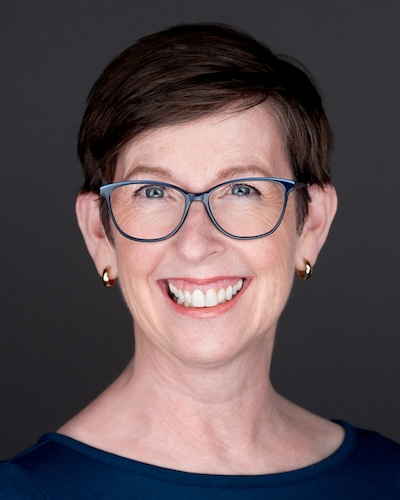
Hello! I’m Janine Adams — a certified professional organizer based in St. Louis, and the creator of Peace of Mind Organizing®.
I love order, harmony + beauty, but I believe that the way that you feel about yourself and your home is what truly matters.
If you’re ready to declutter with a purpose and add more ease to your life, you’ve found the right blog — and you’ve found the right company.
read more »Links
- Shannon Wilkinson, life coach
- Ravelry
- Getting to Good Enough podcast
- Institute for Challenging Disorganization
- Organize Your Family History
- National Association of Productivity and Organizing Professionals
- Peace of Mind Spending
- NAPO St. Louis
- Are you interested in becoming a professional organizer?