The best organizing system
Clients will often ask me, “What’s the best way to organize [fill in the blank]?” Oh, how I wish I had an easy-to-implement answer to that question. Because the real answer is this:
The best organizing system is the one that works for you.
That is, it’s a system that works with the way you think, that’s easy for you to maintain, and that has the possibility of becoming second nature to you.
And the trouble with that is that the best organizing system for me, or for your best friend, may not be the best organizing system for you.
Most of my clients have tried implementing many systems by the time they call me in for help. I know I tried many, many systems over the years. And I still switch things up occasionally.
So when a client asks me that question, all I can do is make suggestions, see which ones make her eyes light up or her head nod, and then try implementing those. And then we tweak and sometimes completely overhaul until we come up with system that works. At least for the moment.
Because here’s the other thing: Organizing systems need to change when your life changes. And life is always changing.
So there’s no such thing as the best organizing system. Don’t even try to find it. Instead focus on finding a great system that works for you at this particular stage of your life or business.
Worth repeating: Finding time to do the things you love
I wrote this post in July of 2012 and it still rings true. When the fun or rewarding parts of life become just aspirations, rather than reality, we miss out. The special project that I referred to at the end of this post was my blog, Organize Your Family History that I debuted that summer. It has provided lots of motivation for me to pursue my genealogy research!
For more than ten years, I’ve been interested in doing family history research. I would dip my toe in the water every now and then, but would get overwhelmed and withdraw it. Mostly, I just didn’t feel I had the time to do it properly. So I didn’t do it at all.
Mind you, I didn’t have a lot of time. I’ve been pretty darn busy building my business and fulfilling some pretty major volunteer duties. But now those volunteer commitments are over and I’m under less pressure. So when my scheduled lightened up, guess what I turned to? Yes, the family history research.
I’m enjoying my research so much that I’m kicking myself for not finding time earlier. It’s one those things (like decluttering) that you feel you need a giant block of time to do, so you never do it. (Because, really, who has a giant block of time?) But it’s just not true. You can make progress in little chunks of time.
With genealogy, talking with older relatives is really helpful. So it’s the kind of hobby that’s really beneficial to work on sooner, rather than later. I’m visiting my parents soon, armed with all sorts of questions. I kind of wish I’d asked them ten years ago when my parents memories’ were probably better.
So here’s my point: If you have a something you’ve been waiting to find time to do, stop waiting. Just get started. Maybe all you have is a spare hour, rather than a full day available. That’s okay. Use it. Maybe you’ll have another hour tomorrow. And you can use that. Just getting started can be the hardest part. And it feels so good to get started!
By the way, I’m discovering all sorts of interesting things about my family history and I’m working on a special project surrounding that, which I will discuss here soon.
Adding structure to an unstructured day
The other day I found myself with a work day with no appointments in it all. Nothing to structure the day into chunks. I had a task list, but I found the lack of structure made it a little hard for me to focus on what I needed to get done.
I find it easier when I have phone appointments or other commitments to put brackets around time slots and give me tiny deadlines throughout the day.
So I decided to create my own structure. Here’s how I did it. I wrote down the top five things I wanted to get done. One of those things I called Power Hour. I took a look at my task list and marked those small admin items that had been piling up and decided I’d try to get seven of them done during a Power Hour. (I created a tag called Power Hour in Springpad so I could easily group together these tasks on my Ninja Task Manager notebook.)
On a piece of paper, I wrote down five two-hour time slots and slotted in four of the major tasks categories. I doubled up a little, actually—I put “work out” and “blog” in one time slot, for instance.
Here’s a photo of that piece of paper.
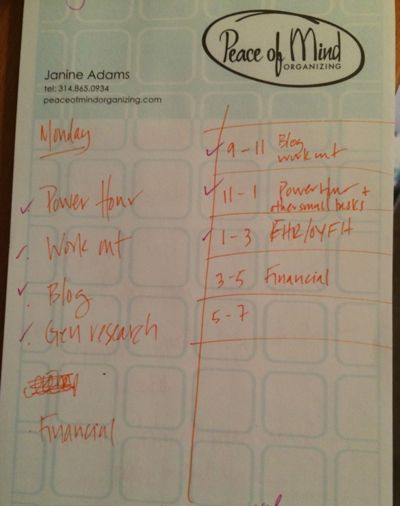
Doing that created some structure, with a little urgency built in. It’s amazing to me what a difference that made in my productivity. It allowed me to focus on the task at hand. It helped me keep an eye on the clock and gauge my progress. And I did get a whole lot done!
True confession: I didn’t everything done. As you can see in the illustration, I didn’t manage to do any of the financial work (either Quickbooks or Turbo Tax) that I’d set out to do. The lesson here is to schedule the important stuff in the first part of the day.
Next time you feel like you’re floating around an unstructured day, perhaps you can create a little structure for it!
Springpad launches Notebook Store
I’ve been using the free website and app Springpad for a few months now and if you’ve been reading my blog you know that I’m quite a fan. It’s helped me eliminate random notes and scraps of paper and, for the first time, I’m using an electronic task list successfully.
Springpad is now making itself even easier to love. They’ve launched a new Notebook Store (think Apple app store, except right now all the notebooks are free!), full of custom notebooks, most of which were created with experts. These custom notebooks make Springpad even more useful and, perhaps, easier to get started in.

My two custom notebooks, The Habit Maker and the Family History Organizer, which were launched in January are part of the new Notebook Store. (Just click on the links.)
In addition, there are another four dozen or so other custom notebooks, organized into the following categories:
- Home and Living
- Cooking and Food
- Tasks and Productivity
- Travel
- Family and Parenting
One notebook I’m really excited to tell you about is Command Central On-The-Go, created by my friend Aby Garvey, of simplify 101. It’s a fabulous, portable command center, where you can keep track of errands, shopping lists, notes (like room measurements and paint colors) and events, like gift lists. It also has a section with links to great resources available through simplify 101.

I had an epic shopping trip the other day that took me to five different stores, each with a different shopping list. I used the Command Central On-The-Go notebook on my phone to keep me on track. It was fantastic.
To me, the Notebook Store helps answer the question: What’s the difference between Springpad and Evernote? While Springpad does a great job of capturing information, the custom notebooks take it to another level.
I can’t wait to explore more of the custom notebooks as time allows. But let me share with you which notebooks in my account are getting the most use:
- The Ninja Task Manager
- Family History Organizer
- My Books
- Command Central On-The-Go
- Blog Post Ideas
- My Movies
I use Springpad each and every day. The fact that I have one place to store all this information and that it’s readily available to me on all devices (even when I’m not connected to the Internet) makes Springpad an incredibly useful resource for me. If you haven’t tried it yet, the Notebook Store is a great place to start.
Reigning in the charging cables
One challenge that the modern gadget-using family must contend with is the abundance of charging cables necessary to keep those devices up and running. There’s a sad lack of standardization and you may have as many different kinds of cables as you have different kinds of devices.
I deal with this in my house—I have an iPhone 4S, iPad Air, and Kindle Paperwhite that all need frequent recharging. Each of those devices uses a different cable. (When I replace my iPhone soon, I’ll be able to reduce the necessary charging cables by one.) Happily for me, my husband deals with his charging needs in his home office, so I don’t have to factor in his devices.
We have a wine refrigerator in our dining room that sits next to an outlet and has served as my charging area. Originally, I had a 10-watt USB charger plugged into the outlet and I would switch out the charging cable plugged into the USB port. I kept the cables that weren’t in use in a bowl, using labeled binder clips to keep them neat and easy to identify.
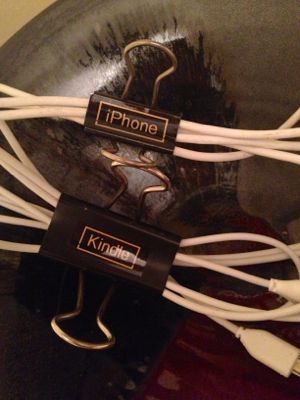
But having to bend down to switch out the USB cable in the wall charger was a drag, so I purchased a four-port USB charger so I could keep my cables plugged in and just switch them out without bending over.
But then I had to figure out how to neatly store the cables that were plugged into the wall, waiting to be used. Luckily for me, the makers of MOS a new, stylish cable solution, offered to send me one to try out. Perfect timing—it’s proven to be a great solution to my problem.
The MOS (which stands for Magnetic Organization System) uses strong magnets, coupled with included magnetic cable ties, to hold your loose cables in place. It has a real Apple aesthetic (which of course pleases me). In fact, the company brags that it is the only cable organizer that Apple will sell in its North American stores.
The base (which contains a strong magnet) is very secure atop my metal wine fridge. If I wanted to mount it on a non-metal surface, the bottom is covered in micro suction cups to hold it in place. An adhesive mounting circle is included for use on a wall.
Here’s a company photo of the product in use.
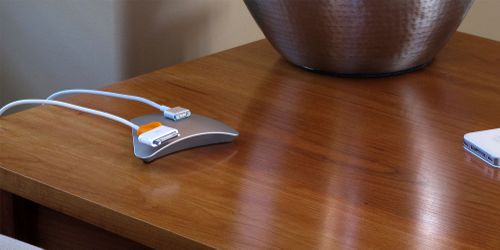
Isn’t that elegant? In my house, it’s somehow not quite as gorgeous, but I think it’s working out very well.
At $20 (on Amazon), the MOS isn’t cheap. But it does serve a real need. I’m contemplating buying a second one to use next to my computer. And perhaps the upcoming MOS Menos mini version for use in my car.
Make charity write-offs easy with iDonatedIt
If you itemize your taxes, taking a deduction for items you’ve donated to charities makes good financial sense. You reduce your tax burden and you don’t have to go through the trouble of trying to sell your unwanted stuff.
The challenge for me has been that the IRS requires me to have itemized list of each individual item donated and its value, in order to substantiate the deduction. (I remember a decade ago, I could just donate a bag of clothes and guess that it was worth $100. Those days are over.)
It’s not that hard to make a list as I fill a bag, but then I had to go to the trouble to figure out the value. Enter iDonatedIt, a $3 iPhone/iPad app that makes the process a lot easier.
Last weekend, I cleaned out my closet and selected 24 articles of clothing that I no longer wear. I decided to donate them to the NCJW Resale Shop here in St. Louis. They only accept items of high quality, so I chose barely worn items to donate.
I opened IDonatedIt on my iPad and entered each article, telling the app the quality level (Good/Better/Best) and it created a list, complete with value. Here’s a screenshot:
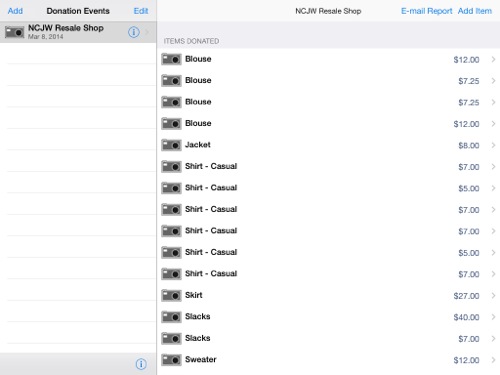
The app gives you the opportunity add a photograph to each entry, but since a photo isn’t required by the IRS, I didn’t go to the trouble.
When I was finished, I emailed it to myself, then printed out the list and attached it to the receipt I’d been given by the Resale Shop staff. I put it in my even-year tax file where it will be waiting for me at the beginning of 2015 when I do my taxes.
This was so much easier than keeping a pen-and-paper list and later assigning a value. I have to say this makes the prospect of getting together a donation seem less daunting!
Solving my business-card problem once and for all
Keeping track of business cards is a challenge for me, and, I’ve observed, for many of my clients. I’ve been accumulating them for awhile in a business-card file box (sorted into rough categories) and then when I outgrew the box, the whole bunch went into in a larger bin that sat on a shelf in my office closet.
I blogged about this in May of last year and even went so far as to create an action plan to deal with the cards. But I never followed through on it.
A winter storm blew through St. Louis on Sunday, putting on hold my plans for going out. So I decided it was time to deal with those darn business cards.
Here’s how they looked when I moved them to my desk to deal with them. My plan was to organize them into a larger See Jane Work business-card file box I’d purchased some time back.
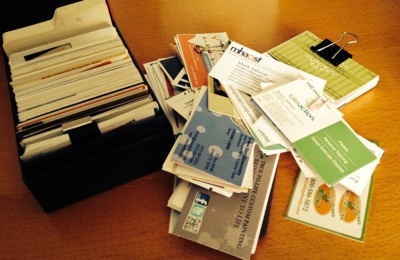
There was no way all these cards would fit in this box.
Before getting started, I thought about why I hang on to business cards. I realized that it’s because I want to be a great resource for my clients. And I’m afraid that I won’t remember the names on the cards I’d collected if I put them in my phone. So my thought was that I would organize the cards into categories for easy access if I have a client who needs a name.
That seemed reasonable until I started thinking about the fact that I like to be able to give my clients the resource immediately, not wait until I get home (and risk forgetting to do it). I’m not going to carry a business-card file box around with me (nor would I if I had a business card book or any other more portable way to carry around business cards.). What I do carry around with me to all client appointments is my phone.
So I decided to use my phone like I would use the file box: I’d enter the contact info by category. But first, I would narrow the cards down to as few as possible, to make the job easier.
I went through the accumulated business cards, being very selective about what I kept. I created categories for the ones I wanted to keep and filed them in the smaller business-card file box.
I threw away a big pile of cards.
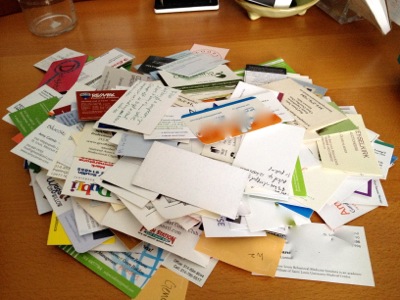
My discard pile was huge!
The next step was to go through the keepers and make sure the ones I really want to refer to clients are in the contacts list on my computer and phone, filed into groups for easy access. I created groups that match the categories in my physical business-card file.
Surprisingly, it didn’t take that long to enter the names and contact info. Less than an hour. I tried to see if I could use my Fujitsu ScanSnap S1500M scanner to take of that task for me, but the business-processing card software that came with the scanner was out of date and I didn’t want to go down the rabbit hole of updating things. So I just entered the names that weren’t already in my computer.
After I was finished with that task, I had a big decision to make: should I keep the physical cards or toss them all? Part of me wanted to keep them, since I had a place to store them. But reason prevailed and I decided to let go of all those resource cards. I kept a few of the cards related to me personally, but tossed a giant pile of cards. Knowing that they’re in my database, backed up regularly, gave me the courage to do that.
And I’m here to tell you it felt good!!
Now, when I pick up a business card, I’ll decide then and there whether to put it in my database. And then I’ll take the 60 seconds or so necessary to add it. And I’ll toss it.
I did keep a few categories of cards. I kept those of some friends, just because they make me feel good when I look at them. I kept a category of cards related to professionals in my home town, who might be of help if problems come up with my aging family. And I kept a category of genealogy-related cards (mostly picked up at the RootsTech conference I attended last month.
This is all the the cards that were left when I finished:
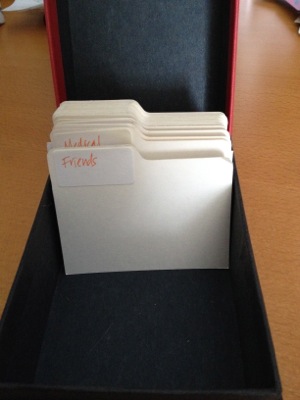
Now my box has more index cards than business cards.
Hooray! It’s a thrill to come up with a solution that works for me for a problem I’ve been grappling with for awhile.
Search
Recent Posts
- Worth repeating: Figuring out what to watch on TV
- The power of incremental progress
- Podcast guest spot on the role of organization for folks with chronic illness
- No excuses series (part 3): "It was a present"
- No excuses series (part 2): "I paid a lot for that item"
- No excuses series (part 1): "But I might need it!"
- Retiring the New Organizer Guides
Tags
About Janine

Hello! I’m Janine Adams — a certified professional organizer based in St. Louis, and the creator of Peace of Mind Organizing®.
I love order, harmony + beauty, but I believe that the way that you feel about yourself and your home is what truly matters.
If you’re ready to declutter with a purpose and add more ease to your life, you’ve found the right blog — and you’ve found the right company.
read more »Links
- Ravelry
- Institute for Challenging Disorganization
- Organize Your Family History
- Are you interested in becoming a professional organizer?
- Shannon Wilkinson, life coach
- Getting to Good Enough podcast
- Peace of Mind Spending
- NAPO St. Louis
- National Association of Productivity and Organizing Professionals