Look for me in Real Simple Clutter-Free Home
There’s a new publication from the Real Simple brand that just hit the newsstands and I’m delighted to be included in it. Real Simple Clutter-Free Home is a compilation, with articles taken from a variety of publications, including:
- Real Simple monthly magazine
- Better Homes and Gardens Secrets of Getting Organized magazine
- The book Better Homes & Gardens Organize Your Home (from back in 2014…organizing tips are timeless)
Quotes from me are included in the “From the Pros” tips included in the 32-page Clutter Cleanse room-by-room plan. I haven’t seen the issue yet, but I’m looking forward to seeing which tips of mine (provided for previous issues of Secrets of Getting Organized magazine) they used.
Here’s a photo of the cover so you can find it on the newsstand.
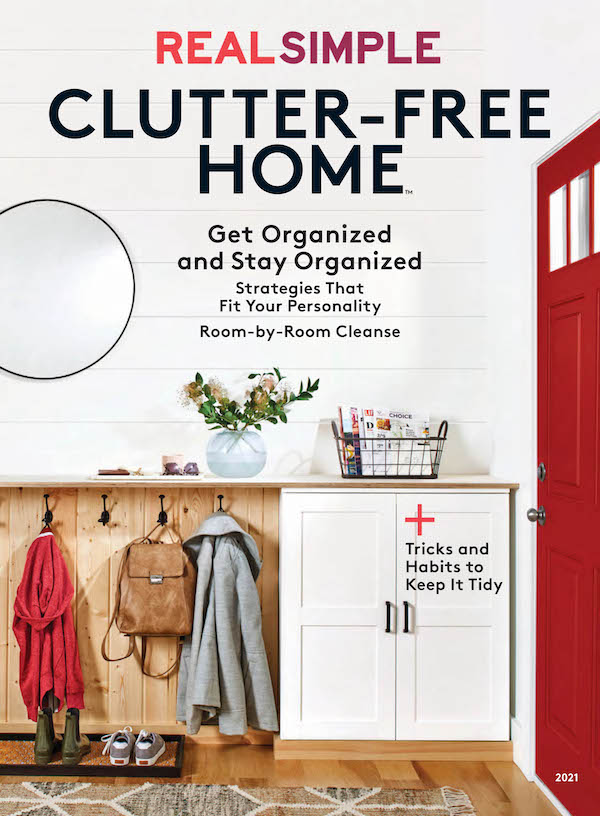
The issue went on sale on June 4 and will be available through September 6. Real Simple Clutter-Free Home is available at newsstands and bookstores nationwide, as well as at grocery stores, home centers, big box retailers, drugstores and discount chains.
If you’d rather not leave the house, you can purchase the magazine online here.
I’m honored to be included with many of my organizing colleagues!
Expectations are everything

It’s amazing what a huge role expectations can play in our perceptions of success. In the organizing industry, managing the expectations the clients have for what we can accomplish prevents them from being disappointed. It can be hard to say things you don’t think the other person wants to hear, but adding a dose of reality to the client’s expectations can save a lot of hassle later.
If you’re a professional organizer, you may be familiar with Standolyn Robertson’s excellent talk that she’s given at the National NAPO conference twice, as well as to various chapters in the past year. It’s called Managing Client Expectations and I think it’s a must-listen for all professional organizers. Standolyn has written a book, also called Managing Client Expectations, a Guide for Professional Organizers, that’s available on Kindle and in paperback. It’s an excellent read.
I’ve been thinking about expectations recently not with regard to my clients (by now I’m pretty good at managing their expectations) but with myself. I realize that if I don’t create a daily task list that’s achievable, I feel bad about my productivity. I can get 15 things done but if I have five unaccomplished tasks on the list I’m disappointed. Instead of feeling great about the 15 things I did, I feel lousy the five undone things. That’s not good.
So I’m trying hard to create a short daily task list (with tasks selected from a longer master list) that feels achievable. It includes the things I do almost every day (blog, yoga, YNAB, family history research) as well as the important and urgent tasks that I would like to do that day. I’m still loving my Trello daily task management board ) but I’ve taken to creating a handwritten (actually hand-lettered) daily task list for the next day at the end of the day. I enjoy doing the lettering and I enjoy working from a pretty list.
When I don’t cross everything off my list, I try to pause and ask myself whether my expectations for the day were realistic. That kind of mindful task management feels like good self care. The good news is I get the same amount done, I just feel better about it!
Worth repeating: A few products can transform a space
Four years ago, I had the pleasure of going to New York City to help a dear friend organize her new apartment. I wrote this post then about how some key products really helped organize her items in her small kitchen.
This week, I had the opportunity to help a dear friend organize the storage spaces of her new apartment in New York City. Having just moved in, she didn’t need any decluttering, so I was able to get busy while she was at work. After I analyzed her needs, I went to the Container Store website and scoped out some products, making a Wish List.
Then I took the subway to the Lexington and 58th Street Container Store and told them I wanted same-day delivery of the products I purchased. I was given a scanner and I wandered through the store, scanning the products I wanted, using my Wish List as my guide. Then I checked out, went back to the apartment and within a few hours the products were delivered (for a $25 fee). It was fabulous.
I just want to show you a couple of photos of how some carefully selected products made a huge difference in this small space.
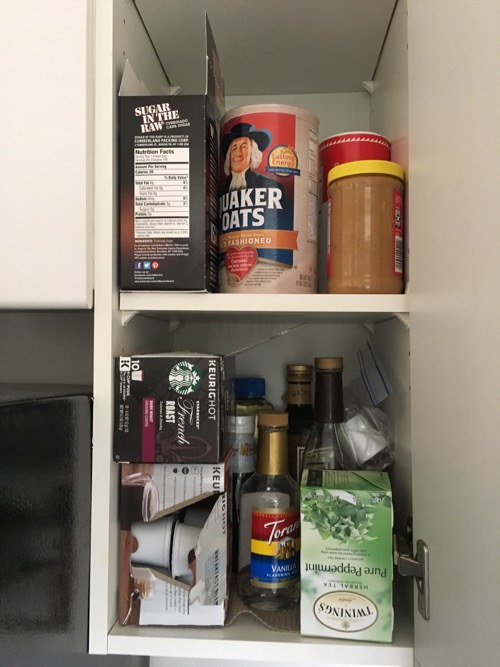
In the kitchen, my friend has a narrow (10 inches wide) cupboard in which she stored supplies to make hot beverages, primarily. She also had a little oil and vinegar and some peanut butter in there.
Here’s the before picture.
And here’s how the space was transformed with a few key products.
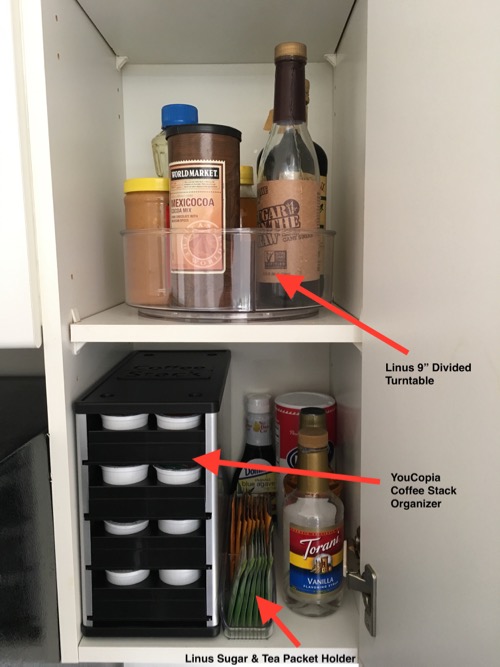
The game changer was the Linus 9-inch Divided Turntable, which now holds her bottles of oils and vinegars, plus some liquid sugar for coffee and her peanut butter. (I moved the oatmeal to the cupboard below, to live with the rest of the breakfast cereal.)
The YouCopia Coffee Stack Organizer was a revelation. My friend has a Keurig and this allowed us to store all her pods in a small, organized space. She buys them in ten-pod packages and each of the four levels of the organizer holds ten pods.
I used the Linus Sugar and Tea Packet Holder to hold her favorite tea bags (the rest are stored higher, in another cupboard; see the picture below) along with some individual packets of Sugar in the Raw. Everything else just fell into place.
Over the microwave, my friend had a bunch of boxes of tea, along with some pasta and some flavored syrup.
Here’s the before picture:
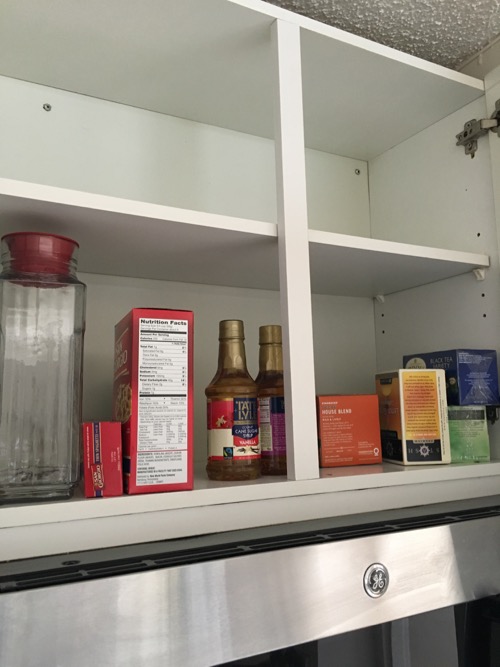
And here’s how it looked after adding just a couple of containers.
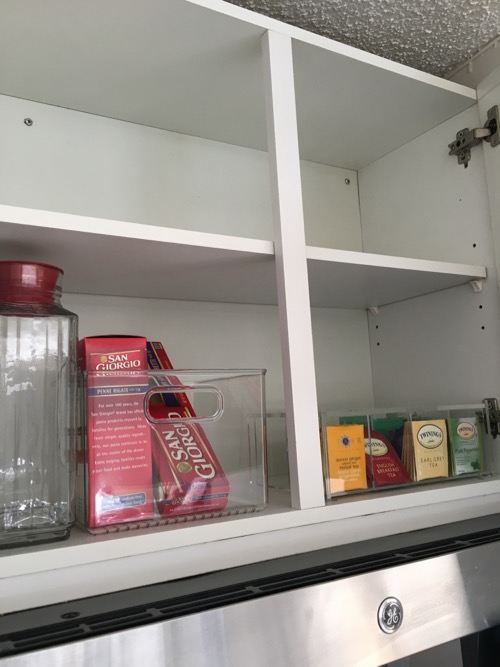
The 8-Compartment Acrylic Tea Box helped coral all those messy boxes. It fit in the space beautifully and held all her tea bags. Heaven.
I used the eight-inch square Linus Pantry Binz to hold her pasta. And I moved the syrups to the skinny cupboard.
I also worked in her bathroom and bedroom closets, which I can save for another post. (I have to get outside and enjoy New York!) It feels so great to be able to help my friend make her apartment so functional!
New, elegant containers from SortJoy
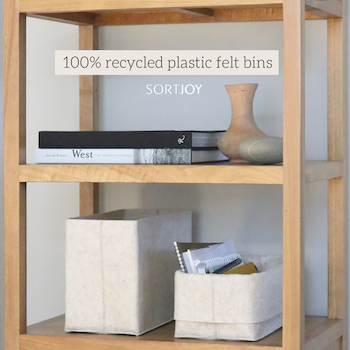
Back in January, I read a note from a NAPO member Stefani Herr, about a new line of containers she had co-developed (with an interior designer) called SortJoy. I admire organizers who bring products to the market so I checked them out was really impressed at the product line’s beauty and versatility. I signed on to become a rep (which means that if you click on my link, I get a commission and, for a limited time, you get a 10% discount). I immediately ordered one for myself.
SortJoy offers felt containers (made from recycled plastic) in several sizes as well as some collapsible containers made from paper. I have a huge bias in favor of felt. As I knitter, I love knitting wool bags and containers and then washing them so they felt. (Remember the felted-wool wastebasket I made for my last car?) So I immediate gravitated toward the felt line.
SortJoy has three types felt containers, The Flex Bin, The Handle Bin, and The Sculpted Bin, which is more rigid. I opted for The Flex Bin, which has a foldable upper edge, so you can adjust the height to fit your needs. (The Handle Bin can also be folded.)
Another thing I love is that SortJoy offers limited choices, which made it much easier for me to decide what to buy. Once I chose felt over paper and no handles, I simply had to decide flex vs sculpted, then shape (square or rectangular), size (regular or small), and color (grey or tan). I am so easily overwhelmed by options that I always like to limit my choices. (That’s one of the things I loved about wearing the same dress for 100 days.)
When my Flex Bin arrived (I ordered a tall, square, tan Flex Bin), I was really pleased with the quality. I immediately put it to use holding my current knitting project, which lives next to my chair in the living room. Since it’s out in the open like that, I loved the simple elegance of the SortJoy bin. I folded down the top to make it easier to access the contents from my chair.
Here’s a photo of the room, with the SortJoy Flex Bin. (Please try to ignore the dog-toy stuffing in front of my chair.)

I’m very pleased with this product and recommend SortJoy to folks who don’t need a clear container and who enjoy the simple elegance of felt.
Worth repeating: Traveling on an airplane with a puppy
I came across this post today and decided to repeat it. It’s got some solid information about flying with a puppy that some might find helpful now that we’re starting to fly more again. Bix is now five and continues to be exceedingly well behaved. I hope you enjoy looking at pictures of Bix as a puppy as much as I did this morning!
If you’ve wondered why I haven’t blogged in a week or so, I have an excellent excuse.
Allow me to introduce Bix.
He’s an eight-week-old standard poodle puppy who joined our family on December 13. Tomorrow he’ll be nine weeks old. He’s absolutely adorable, smart as a whip and well behaved (for a puppy). He’s endlessly amusing.
Here’s a picture of Bix and me, taken by Dianne Janczewski, Bix’s breeder.

Bix came from Clifton Standard Poodles in Clifton, Virginia. I live in St. Louis, which means that I brought Bix home on an airplane. I enjoy planning such things and I gave the journey home with Bix a lot of thought. I had flown with a puppy once before, a dozen years ago, when we brought our departed poodle Kirby home from the breeder in New Jersey. But I didn’t really remember the fine details.
I did a lot of googling but I did not find a whole lot of helpful information. (The most helpful exception: Dog Jaunt.)
So I thought I’d detail a few things here that I did right and wrong in hopes of helping others faced with traveling with a little puppy on an airplane.
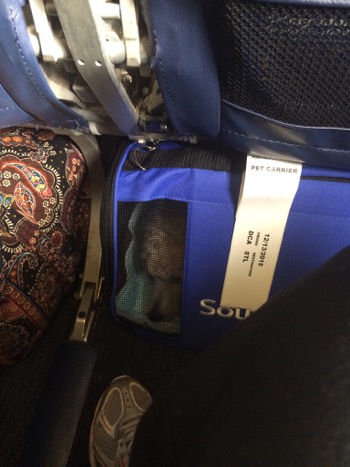
First, let me reassure you that Bix flew in the cabin of the airplane, under the seat in front of me. I flew Southwest and purchased their branded carrier so that I knew it would fit. If my puppy had been a small breed, I might have purchased a higher-quality carrier, like the Sherpa or SturdiBag, but I knew I’d be using this carrier for a very limited time and I felt the peace of mind of knowing it would fit was important.
Overall, everything went very well. My biggest worry had been that Bix would cry and disturb other passengers by whining or barking or that he’d eliminate in the carrier, which would also disturb passengers. He did neither of those things. He just slept, raising his head a little at the noises during takeoff and landing. He was a very good boy and didn’t even seem stressed.
Here’s a picture of him in his carrier on the plane.
What I didn’t anticipate was that he would get motion sick in the car on the way to the airport. My dear friend, Patti, was driving us in her new car and didn’t seem to blink when Bix threw up three times. Luckily, I had some pee pads with me that caught much of the mess, but it was still pretty gross. (He threw up in my car on the way home from the airport, too.)
So based on my experience, I’d like to share some things I did right and some things I did wrong:
Things I did right to prepare for my puppy’s first airplane trip
- I paid attention to the airline’s regulations and bought a carrier that fit.
- I booked a non-stop flight.
- I made a reservation for Bix.
- I bought some DryFur Pads to line his carrier and absorb any messes (which in his case was vomit).
- I bought some Adaptil dog-appeasing-pheromone wipes and wiped down his carrier. That may have contributed to his calmness in the carrier.
- I brought along four pee pads, though I wish I had brought more (see below).
- I had a friend drive me, rather than taking Uber or a cab to the airport; given the vomiting, that would have ratcheted up the stress level for both of us.
- I had my husband meet me at the airport so that we could take Bix directly to the pet-relief area once we landed. He really needed to pee.
Mistakes I made in preparing for my puppy’s first airplane trip
- I didn’t anticipate car sickness. If I had, I would have brought along paper towels and more pee pads.
- I didn’t insist on a private screening from TSA. I had read that I could request a private screening, but I was refused one by TSA. I should have insisted, because I had a difficult, stressful time getting Bix back into his carrier, which opens only in the front. In a private room, it would have been less stressful.
- In retrospect I should purchased the higher-quality Sherpa carrier, which would have been easier to get him in to and out of. The Southwest carrier was taller, which I found appealing. But since Bix was lying down in the carrier, that wasn’t really relevant. And the Southwest was difficult to use and of shoddy quality. And it cost nearly as much as the Sherpa.
I hope if you’re faced with a trip like this one that you’ll find this post helpful. Based on my experience, I wouldn’t hesitate to do it again (though I’d correct the mistakes I made). Certainly getting sweet Bix home to us was well worth the effort!
Here he is on his second day in our home. He was and remains happy and comfortable and not the least traumatized by his travel experience, thank goodness.

Guest post on craft organizing on Meori blog
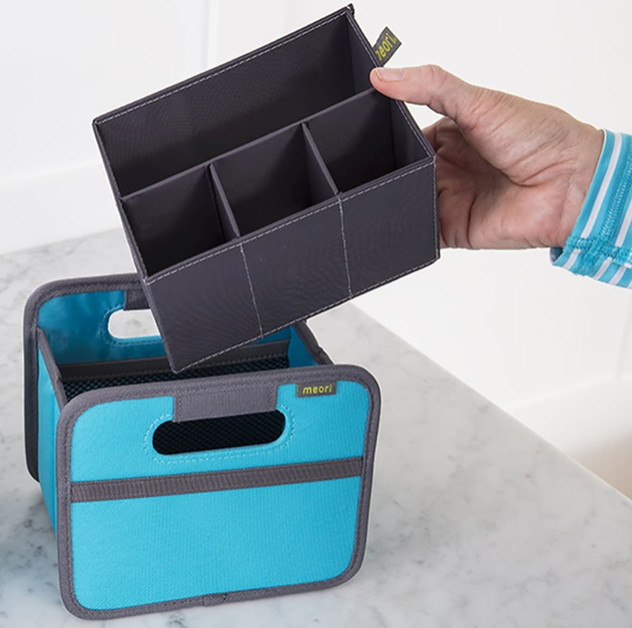
I was tickled to be asked by Meori, the maker of a variety of organizing containers and bags, to contribute to their blog. My post about craft organization, which they named, The 6 Most Helpful Craft Room Organization Ideas, went live last week.
Meori asked for a lengthy post, so that gave me some space to go through the decluttering and organizing process for a craft space. I love a organizing craft room, but it can definitely feel overwhelming when it’s your own space. I’m hoping that my post’s six-step process will help anyone who is struggling with that feeling of overwhelm and frustration!
Meori offers a number containers that can help with craft organizing. They sent me a few to try out and I immediately adopted the Mini Box with Insert (pictured here) to create a little kit for my lettering pens that’s easy to move from room to room.
Sign up for discounts on my genealogy guides
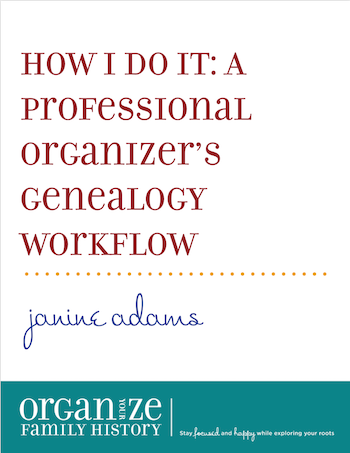
I’m really excited because this weekend I’m launching a new Orderly Roots Guide. These guides are modeled after the Organizing Guides that I’ve written for the public and my Insider’s Guides for New Organizers. All three series of guides offer concise, cut-to-the-chase information on topics I find to be of interest. They’re a low-cost way to tap into my expertise.
The new Orderly Roots Guide, which might of interest to you if you’re one of the millions of people who count genealogy among their hobbies, is called How I Do It: A Professional Organizer’s Genealogy Workflow. (That page will be live on Sunday, May 2.) I’ve also created The Orderly Roots Bundle, which has special pricing on all four guides when purchased together.
The reason I’m writing about it today, before the new guide is available, is to give you the opportunity to sign up for the Organize Your Family History Mailing List. Starting on Sunday, I’ll be sending out a series of emails with helpful information and limited-time promo codes for How I Do It and The Orderly Roots Bundle.
If you click on over and sign up for the mailing list, you’ll save a few dollars on these resources. You’ll also be signing up to receive an email on the last day of every month with links to the previous month’s posts.
If you’re a genealogy fan and don’t already read Organize Your Family History, I encourage you to check it out, especially if you are challenged by organizing your findings.
Search
Recent Posts
- Worth repeating: Figuring out what to watch on TV
- The power of incremental progress
- Podcast guest spot on the role of organization for folks with chronic illness
- No excuses series (part 3): "It was a present"
- No excuses series (part 2): "I paid a lot for that item"
- No excuses series (part 1): "But I might need it!"
- Retiring the New Organizer Guides
Tags
About Janine

Hello! I’m Janine Adams — a certified professional organizer based in St. Louis, and the creator of Peace of Mind Organizing®.
I love order, harmony + beauty, but I believe that the way that you feel about yourself and your home is what truly matters.
If you’re ready to declutter with a purpose and add more ease to your life, you’ve found the right blog — and you’ve found the right company.
read more »Links
- Organize Your Family History
- Institute for Challenging Disorganization
- National Association of Productivity and Organizing Professionals
- NAPO St. Louis
- Shannon Wilkinson, life coach
- Are you interested in becoming a professional organizer?
- Ravelry
- Peace of Mind Spending
- Getting to Good Enough podcast