Worth repeating: BookBub makes my Kindle even better
I discovered BookBub, the site that notifies me of bargains on digital books, four years ago. I blogged about it then and I want to post it again because I love it even more now than I did then. I have many books on my Kindle and between BookBub and my library, I’ve paid very little for books in the almost five years I’ve had my Kindle. When my list of bargain books come in every day from BookBub, I almost always ignore the ones that aren’t free, to narrow down the choices. I keep track of my Kindle library in Evernote and between BookBub and my Evernote list, I feel such abundance (and no overwhelm) when it comes to reading material. If you like to read books on an e-reader, I encourage you to check out BookBub!
When I bought my Kindle Paperwhite
But then I read in the New York Times about BookBub. This website is my new best friend. When I registered (which was free), I designated the genres of books I’m interested in and I chose the Kindle format. (It’s also available for Nook, Android Sony Reader, iPad and Kobo.) Now each day I receive an email with a list of Kindle books that are either very low cost (like $2.99) or free. They’re available that day only at that price.
So pretty much every day I download at least one book that I might want to read. It literally takes me two clicks. And now as soon as I finish a book, I have a bunch of new books to choose from. And I’m not cluttering up my bookshelves.
It’s heaven. It doesn’t cost me a dime. And I’m reading like crazy.
I love technology!
Letterbox gives you a clutter-free way to keep your cards and letters
Occasionally I see clients who hang onto all the cards (holiday or otherwise) they ever receive. Over the years that can pose a significant challenge if there isn’t room to store all of them. (And who has that kind of room?)
Personally, I toss the holiday cards I receive, probably a month after Christmas. I get a twinge every time I do it, but I don’t want to take up space in my home with anything but the most significant, precious handwritten items, like letters from my now-deceased grandmother.
I just learned about something that I think is a nice middle ground between these two extremes. Today I was contacted by Letterbox, a new app debuting on November 30 designed specifically to help people hang on to the cards they receive, digitally and clutter-free.
You could take pictures of all your cards with your phone but then what you do with those photos so that you can find and enjoy them later? Letterbox allows you to put photos of your cards (front and inside) all in one place, accessible in the app, and allows you to organize them by friend, occasion and date.
(And, of course, this would be great for letters and postcards as well as greeting cards.)
Here’s how it works:
- From within the app (which at the moment is available for the iPhone only), you take high-resolution pictures of the front and inside of the card. It automatically focuses, snaps and crops the photos for you. (I love that.)
- You designate who the card was from and the occasion.
- Then you can see all your cards in a timeline (which reminds me a bit of Pinterest) and enjoy them with a single touch.
If your friends also have Letterbox, you can see when they cards you’ve sent, so you know they’ve been received. And you can synch addresses so that you know your friends’ addresses are up to date.
Check out the video:
I haven’t tried it yet because the app hasn’t been released. But on November 30, I’ll be downloading it—this year I’ll try putting my holiday cards into Letterbox, rather than the recycling bin.
Letterbox costs $6 per year. If you’re one of the first 10,000 to sign up before November 30, you can get it for $3 per year and you can sign up for up to 10 years at that rate. If you order from my sign-up page, I’ll get a small portion of your payment (no extra cost to you).
Handwritten items are among the very few things in our lives that are irreplaceable. I love that Letterbox is providing an easy and elegant to preserve them without adding clutter to our homes.
Limiting your holiday gift giving
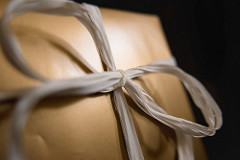
I’m a big believer in not giving people clutter as gifts. In my clients’ homes, I often see how hard it is for them to let go of items they received as a gift, even if they don’t like or don’t use the item. As I’ve blogged about before I’m in favor of making the holiday season easier on gift givers by simplifying or limiting the gifts you give and receive.
How about stopping giving gifts altogether?
It’s late October. As you’re thinking about your Christmas or Hanukkah gift list this year do you think you could approach some of the adults on the list and propose that you not exchange gifts at all? Think of the benefits:
- Less time spent shopping
- Less time spent wrapping
- Less money spent on gifts
- Less emotion spent angsting over the perfect gift
- No worry about adding clutter to your loved one’s home
You don’t have to eschew the exchange of gifts altogether (though I think that’s a great idea). You could replace a physical gift with an event you could attend together. Or a spa day. Or a meal. Or you could agree to make a donation to a charity on the other person’s behalf.
I exchange very few gifts in December and I have the easiest holiday season of anyone I know. (I do send out holiday cards, but I really enjoy doing that.)
How would it feel to let go of buying so many gifts (and also receive fewer gifts)? If the prospect of limiting your gift giving gives you a sense of ease, I suggest you try contacting one person on your gift list and see how s/he would feel about not exchanging gifts this year. I wouldn’t be surprised if your suggestion was met with great enthusiasm. Taking away the pressure to give might be a gift in itself.
Then approach someone else. And another person. If you whittle down your list of people you have to shop for, your holiday season might become less stressful and more celebratory. Doesn’t that sound nice?
Photo by Piviso.com via Flickr. Used under Creative Commons License.
Worth repeating: I heart West Elm's dip bowls
Four years ago, I wrote this post about how much I love the little dip bowls from West Elm. My love for them has not diminished over time. And, amazingly, West Elm is still selling these little beauties, so I thought I’d repeat this post. I now actually use them for dip on occasion! But I like them for all sorts of things, including looking pretty.
While on a trip, I wandered into a West Elm store and was immediately entranced by these beautiful little Textured Dip Bowls. I don’t serve a lot of dip, but I immediately saw the potential for using them to store little stuff. (My friend Aby Garvey is rubbing off on me after all these years.)
So I bought one. At first I thought I might use it for office supplies. Wouldn’t it be nice on a desk holding paper clips?
But then I saw an immediate need in my medicine cabinet. I had several different sizes of fingernail and toenail clippers rattling around in there and now they’re beautifully contained.
Soon, I bought two more for my other medicine cabinet (for clippers and our collection of dental floss).
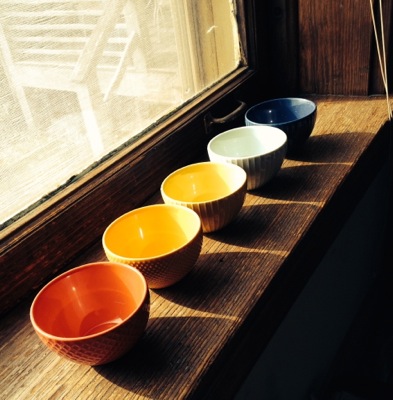
Then I decided I needed some for use at clients’ homes, so I went online and bought the rainbow of bowls pictured above.
The potential seems endless. Right now all five of my extra are sitting on my window sill, in the sun, making me happy every time I look at them.
Taking time out for fun
I love doing genealogy research. (If you’d like to know more about that, check out my blog Organize Your Family History.) I’ve actually created a habit of doing research every day, first thing in the morning. I haven’t missed a day since August 1—which especially pleases me because I took a week-long trip during that time.
I research frequently, but not typically at length. I try to research for at least 30 minutes a day. Occasionally the research session is shorter than that and sometimes it’s longer. For example, I spent most of the day researching with a friend last month at the St. Louis County Library’s Genealogy Room.
I was hoping to take a research trip to Kentucky this month, but decided it wasn’t a prudent way to spend my time and money. My consolation prize is that I’m going to spend all day today and tomorrow on my research. After I get a couple of work-related tasks out of the way, I’m going to focus on my research, with the intention of visiting the St. Louis Public Library’s Genealogy Room and perhaps making my way back to the County library. Getting away from my desk and its distractions will be really helpful.
Why am I writing about that here? Because I think it’s so easy for us to let the responsibilities and tasks of home and work life get in the way of pursuing our passions and having fun. It feels like I could spend all day every day running my business and keeping my house organized. But that’s not the life I want to lead.
For me, genealogy is the passion I want to explore more. For you it might be a yoga practice or a craft. Whatever it is, I encourage you to try making time to do it. I can assure you, the other stuff will wait.
Do you subscribe to my newsletter?
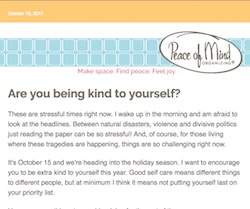
In addition to blogging here a couple of times a week, I also have a monthly newsletter, which comes out on the 15th of the month. There’s not a whole lot of overlap between the two, though occasionally I like a newsletter article so much I run it in the blog (or vice versa). And each newsletter contains links to four or five favorite blog posts from the previous month.
Some months, I have special offers for newsletter readers only.
Just over a month ago, I had the newsletter format changed so it would be mobile responsive. It’s a cleaner, easy-to-read look, no matter if you’re reading it on your phone, tablet or computer.
You can read the archives of the newsletter (I’ve published it monthly since the beginning of 2008!) and/or subscribe so that it lands in your email inbox on the 15th of every month. If you subscribe, you’ll receive my free pdf, The 12 Most Common Organizing Mistakes.
Just go to the Newsletters page of my website to read the newsletter archive or subscribe to new newsletters.
Putting Profit First
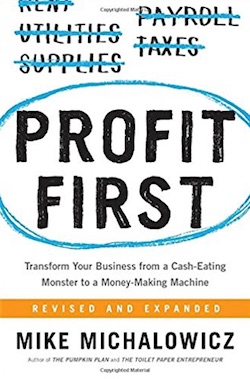
In the spring of 2016, I read the book Profit First by Mike Michalowicz. I had heard a talk about the Profit First concept from Cathy Sexton of The Productivity Experts who gave a presentation about it to the St. Louis chapter of the National Association of Productivity and Organizing Professionals. I was intrigued so I bought the book. After I read the book, I decided to implement the system. It’s been wonderful for my business and for my financial security.
The basic premise of the system is to pay yourself first and also put away money for taxes and profit, before paying operating expenses. Most people pay operating expenses first and risk running out of money for taxes or for paying themselves. Michalowicz calls it “reverse engineering your profitability.”
I set up a spreadsheet in which I enter each payment I receive from a client. In the spreadsheet I designate how much of that deposit was paid out in wages and materials. The difference is my Real Revenue. In the spreadsheet I allocate 15 percent of Real Revenue for taxes, 5 percent for profit and 50 percent for owner’s pay. The remaining 30 percent is for operating expenses. According to Michaelowicz, if I can’t afford to pay my operating expenses from that 30 percent, then I need to cut my operating expenses.
Twice a month, I tally up my taxes, profit and owner’s pay amounts and transfer them from default Operating Expenses bank account into the appropriate bank accounts. This means that I have four bank accounts (Operating Expenses, Owner’s Pay, Tax and Profit), rather than the two I formerly had for my business (Checking and Savings). Once the tiny bit of work to set up those accounts was done, it became very easy.
This shift in thinking has been revolutionary for me. My revenue, like that of many professional organizers and small business owners, fluctuates. By consistently transferring 50 percent of my Real Revenue into my Owner’s Pay account and then transferring a set amount from the Owner’s Pay account into the joint account shared by my husband and me, I avoid suffering because of that fluctuation. During flush times, the balance of the Owner’s Pay account grows, creating a reserve for the lean times.
When it’s time to pay my quarterly estimated taxes, the money is waiting for me in my Tax account. Watching my Profit account grow is a real joy. Even more enjoyable is the quarterly bonus I give myself. Profit First mandates that you take one-half of the amount you transferred into your Profit account each quarter as a quarterly bonus. (The rest stays in the Profit account as a reserve.) You’re not supposed to use the bonus for your business. It’s supposed to be used for something fun, like a vacation.
In my case, I purchased tickets to see Hamilton, my favorite musical, in Chicago with my bonuses. I’ve now seen it twice! I can spend a hefty amount for this pleasure without guilt because of Profit First. That feels amazing.
If you’re a small business owner, I heartily recommend reading this book and giving serious thought to implementing the program. There are detailed instructions, including what the appropriate percentages for your business are. A second edition came out earlier this year, which I purchased I read. It’s so worthwhile!
Search
Recent Posts
- Worth repeating: Figuring out what to watch on TV
- The power of incremental progress
- Podcast guest spot on the role of organization for folks with chronic illness
- No excuses series (part 3): "It was a present"
- No excuses series (part 2): "I paid a lot for that item"
- No excuses series (part 1): "But I might need it!"
- Retiring the New Organizer Guides
Tags
About Janine

Hello! I’m Janine Adams — a certified professional organizer based in St. Louis, and the creator of Peace of Mind Organizing®.
I love order, harmony + beauty, but I believe that the way that you feel about yourself and your home is what truly matters.
If you’re ready to declutter with a purpose and add more ease to your life, you’ve found the right blog — and you’ve found the right company.
read more »Links
- Institute for Challenging Disorganization
- National Association of Productivity and Organizing Professionals
- Getting to Good Enough podcast
- NAPO St. Louis
- Peace of Mind Spending
- Ravelry
- Shannon Wilkinson, life coach
- Organize Your Family History
- Are you interested in becoming a professional organizer?